FigureDraft

A WORKSPACE FOR RESEARCH COMMUNICATION

AI Scientific Figure Generator

Explain your research with a clear scientific illustration. Describe the idea, confirm the details, and turn it into a visual draft.

For explanatory illustrations—not experimental evidence.

01 / Describe your figure

Labels, image size & visual instructions

Extraction sends your summary, and image generation your confirmed description, to the selected provider. Submit only research you are authorized to share with that provider. Current processing provider: Qianwen AI (maas.qianwenaiapi.com).Privacy Policy

Each successful image uses 1 credit, including new versions. Failed tasks release reserved credits. PNG download uses no additional credits.

Selected scientific figure examples

The original PNGs are actual FigureDraft outputs from English demonstration inputs. External redraws are labeled separately. Review notes describe visible limitations; none of these examples have received independent scientific review.

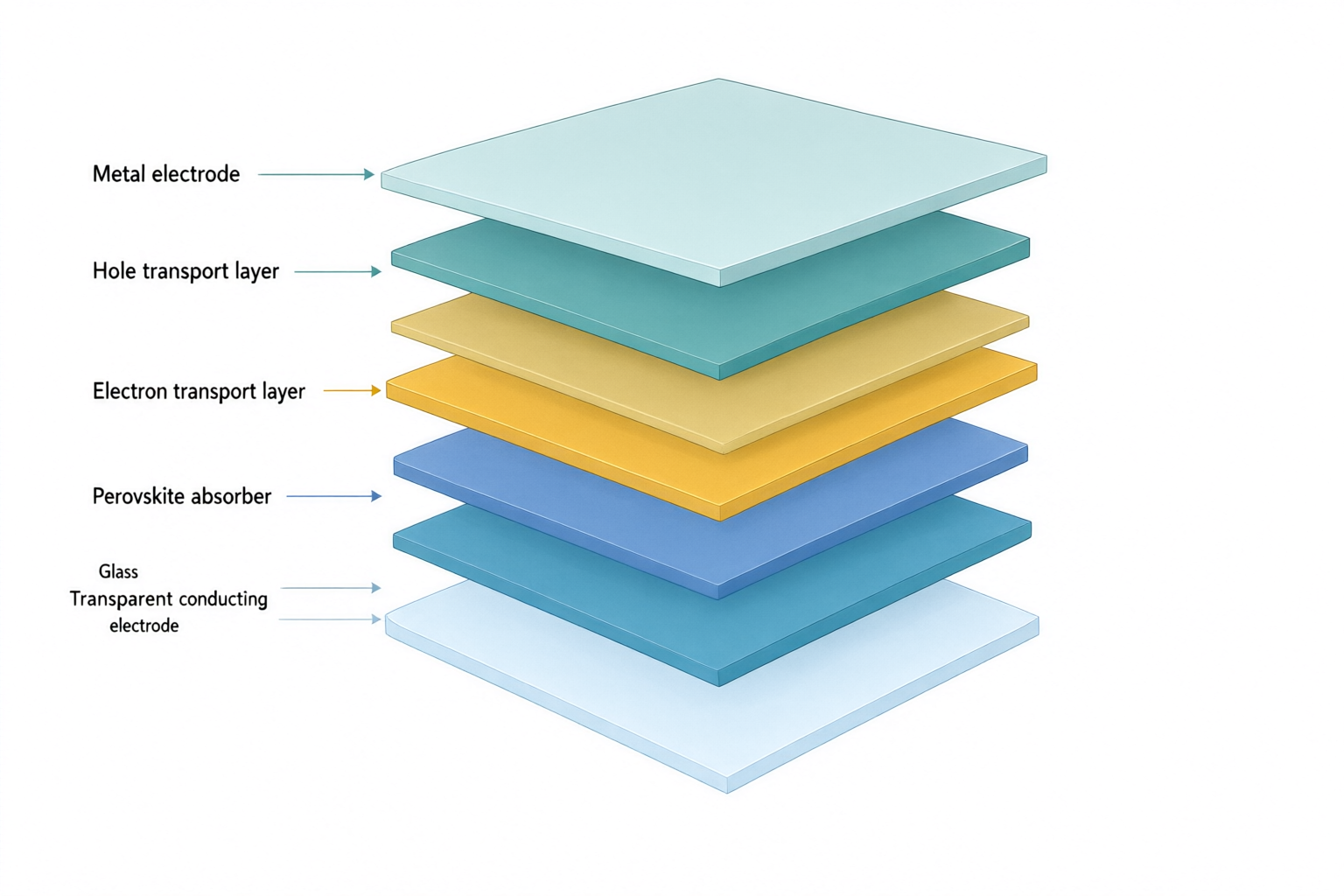
Exploded solar cell stack with labels for glass, transparent electrode, electron transport, perovskite, hole transport and metal.
Original PNGqwen-image-3.0 · 1536 × 1024

Externally redrawn reference
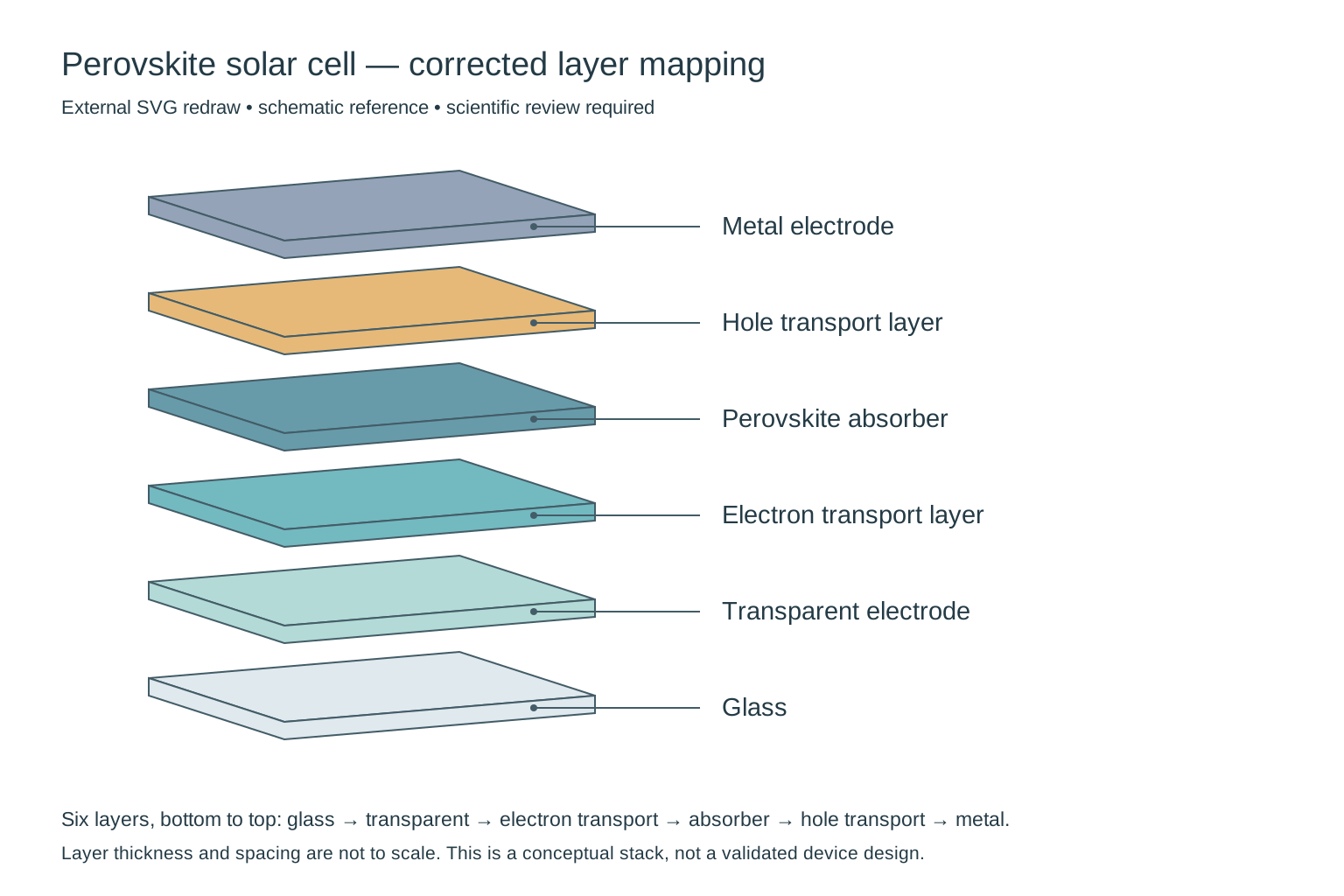
External redraw of exactly six solar-cell layers, from glass at the bottom to metal at the top, with each label connected to its own layer.
External SVG redraw for comparison, not a direct product output or an in-app editing feature. Still requires scientific review.

Scientific image

Perovskite solar cell layers

Review notes

Needs correction: the output adds a seventh slab and does not preserve the requested layer-to-label mapping. In particular, check the electron-transport/perovskite order and the two bottom labels. This is a composition draft, not a validated device architecture; thickness is not to scale.

Externally redrawn reference

Removed the extra slab, restored the requested six-layer sequence and attached each leader to its matching layer. Thickness and spacing remain schematic; this does not validate a particular device architecture.

Input and confirmed content
Research concept
An exploded three-quarter cutaway of a conceptual planar perovskite solar cell. Show exactly six separate solid flat slabs, one slab per material, with equal gaps and no internal textures or additional sublayers.
Objects to include
Glass substrate; transparent conducting electrode; electron transport layer; perovskite absorber; hole transport layer; metal electrode.
Relationships and arrows
Stack exactly six layers in the listed order, from glass at the bottom to metal at the top. Connect each label to the middle of its corresponding slab using a thin leader line without arrowheads. Layer thickness is schematic, not to scale.
Exact labels · optional
Glass; Transparent electrode; Electron transport layer; Perovskite absorber; Hole transport layer; Metal electrode
Visual instructions · optional
Minimal textbook diagram with ample whitespace and teal, blue and amber colors. Print ONLY the short labels explicitly listed in the content. No subtitles, paragraphs, footnotes or extra words. These are drawing directions, not text to display.
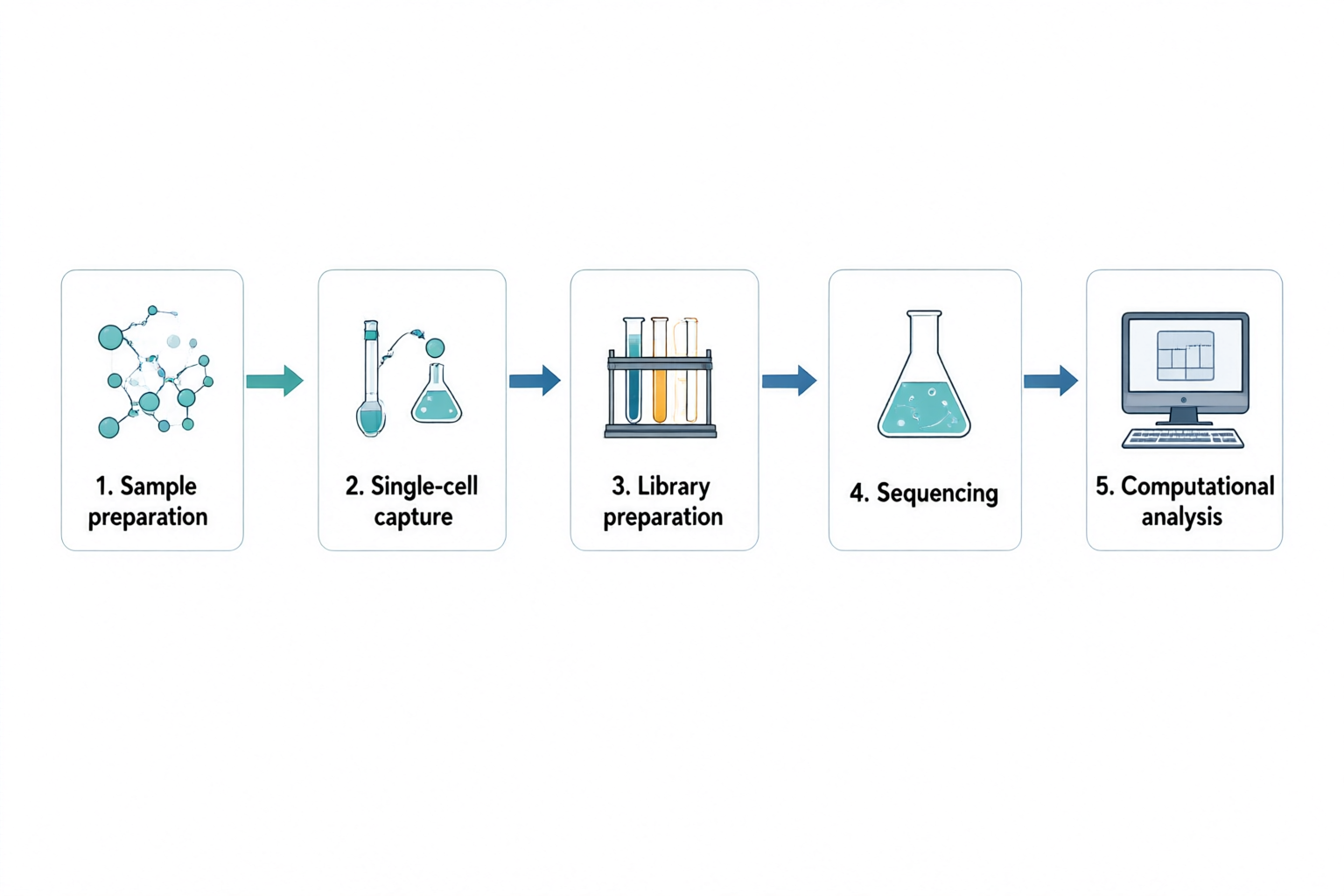
Five panels connected left to right: sample preparation, single-cell capture, library preparation, sequencing and computational analysis.
Original PNGqwen-image-3.0 · 1536 × 1024

Scientific illustration

Single-cell RNA sequencing workflow

Review notes

The five labels and four connecting arrows follow the requested left-to-right order. The sequencing stage uses a generic flask rather than a sequencing instrument. Replace that icon for a technical methods figure; this overview does not specify an assay protocol or show measured data.

Input and confirmed content
Research concept
A high-level five-step workflow for single-cell RNA sequencing. Show a left-to-right sequence with numbered panels and one clear arrow between neighboring steps. Do not depict real sequencing measurements or an actual clustering result.
Objects to include
Sample preparation; single-cell capture; library preparation; sequencing; computational analysis.
Relationships and arrows
Sample preparation leads to single-cell capture, then library preparation, sequencing and computational analysis. Use simple lab icons and a computer icon for the final stage. No branches or backward arrows.
Exact labels · optional
1. Sample preparation; 2. Single-cell capture; 3. Library preparation; 4. Sequencing; 5. Computational analysis
Visual instructions · optional
Minimal textbook diagram with ample whitespace and teal, blue and amber colors. Print ONLY the short labels explicitly listed in the content. No subtitles, paragraphs, footnotes or extra words. These are drawing directions, not text to display.
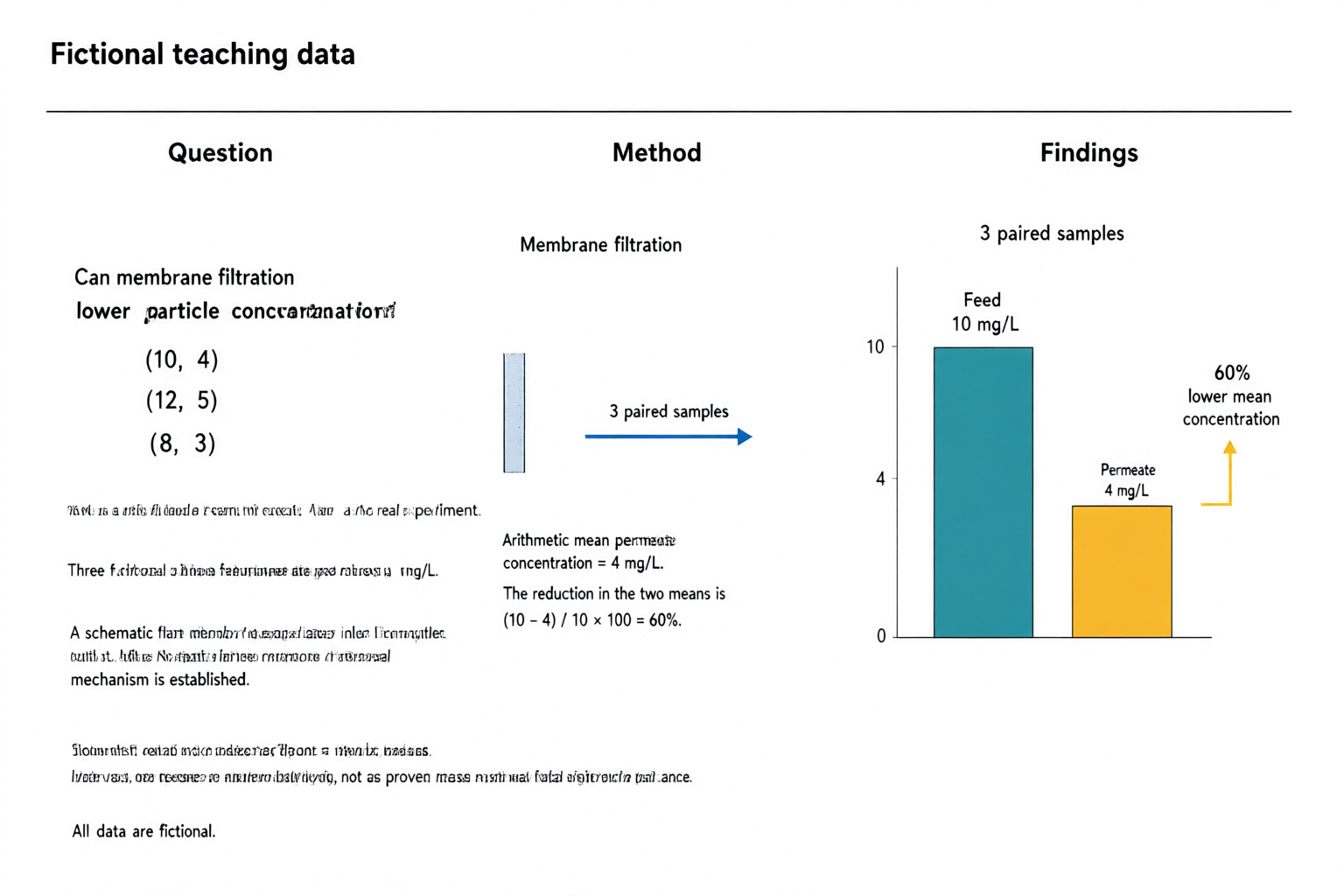
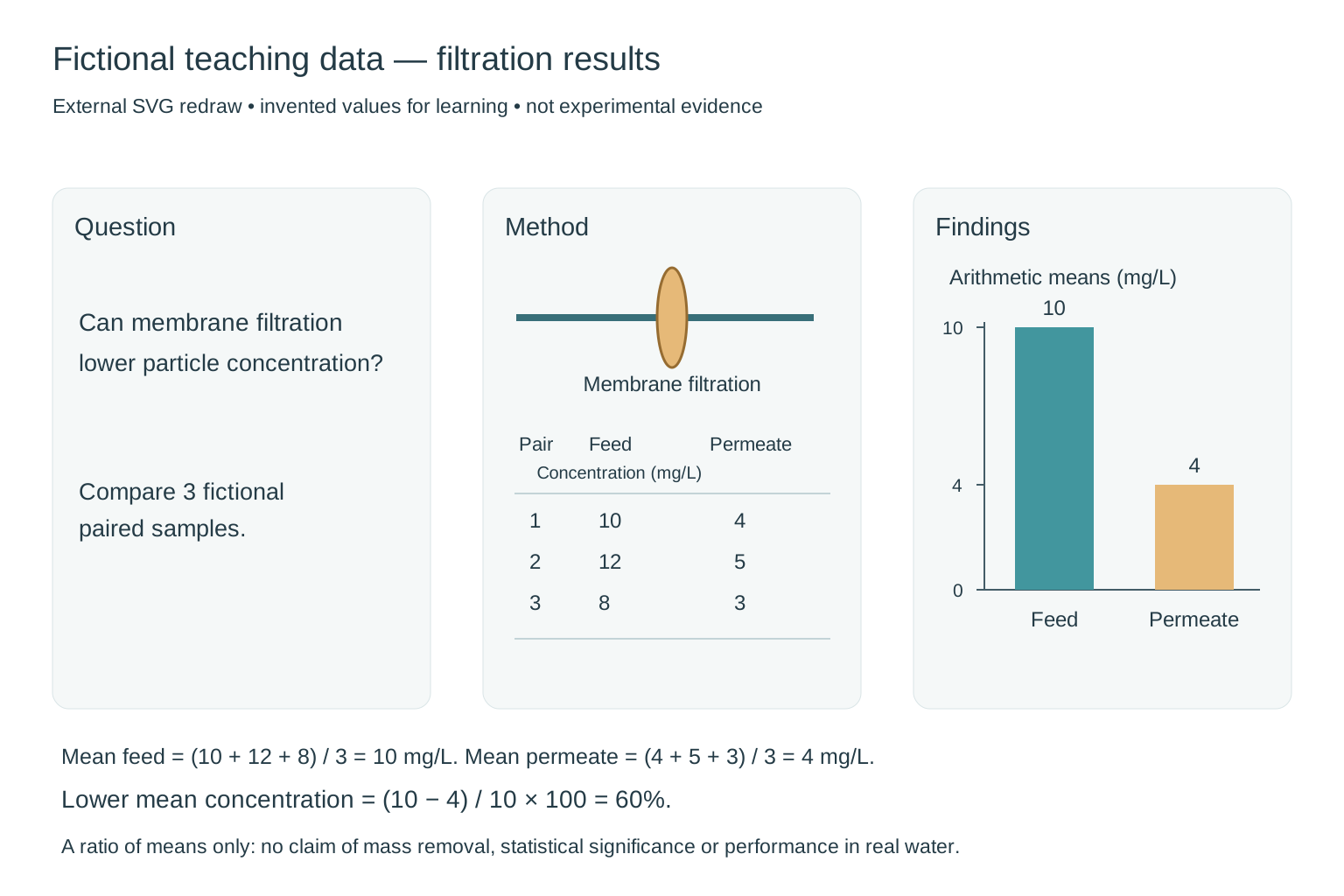
AI-generated fictional teaching abstract with question, filtration method and a zero-baseline chart showing feed at 10 mg/L and permeate at 4 mg/L, with a 60 percent lower mean.
Original PNGqwen-image-3.0 · 1536 × 1024

Externally redrawn reference

External redraw of a fictional filtration abstract: three paired concentrations 10/4, 12/5 and 8/3 mg/L, arithmetic means 10 and 4, and a chart with a zero baseline and 60 percent lower mean concentration.
External SVG redraw for comparison, not a direct product output or an in-app editing feature. Still requires scientific review.

Graphical abstract

Filtration results — fictional teaching data

Review notes

Fictional teaching data, not experimental evidence. The three feed/permeate pairs are (10, 4), (12, 5), (8, 3) mg/L. Their means are 10 and 4 mg/L, so (10 − 4) / 10 × 100 = 60% lower mean concentration. The original chart preserves these values and a zero baseline, but the extra small text is malformed and the membrane apparatus is incomplete. The 60% is a ratio of means, not proof of mass removal, a mean of individual percentages or statistical significance.

Externally redrawn reference

Replaced malformed text with a clear question, a schematic membrane and the complete paired teaching dataset. Redrew the two bars on a shared zero baseline with heights in a 10:4 ratio. Both the figure and its caption identify the data as fictional; no error bars or significance claim are invented.

Input and confirmed content
Research question
Can membrane filtration lower particle concentration? This is a fictional teaching example, not a real experiment.
Method
Three fictional paired feed/permeate concentrations in mg/L: (10, 4), (12, 5), (8, 3). A schematic flat membrane separates inlet from outlet. No statistical inference or removal mechanism is established.
Main findings
Arithmetic mean feed concentration = 10 mg/L; arithmetic mean permeate concentration = 4 mg/L. The reduction in the two means is (10 - 4) / 10 × 100 = 60%. Show this as lower mean concentration, not as proven mass removal or statistical significance. All data are fictional.
Visual instructions · optional
Minimal textbook diagram with ample whitespace and teal, blue and amber colors. Print ONLY the short labels explicitly listed in the content. No subtitles, paragraphs, footnotes or extra words. These are drawing directions, not text to display. Prominently label the whole figure "Fictional teaching data". Three panels: Question, Method, Findings. ONLY additional labels: "Membrane filtration", "3 paired samples", "Feed: 10 mg/L", "Permeate: 4 mg/L", "60% lower mean concentration". Use a simple two-bar chart with a zero baseline, feed bar height 10 and permeate bar height 4. No other numerical claims.
START WITH AN IDEA

Scientific figure examples: starter prompts

These are demonstration inputs, not generated results or customer research.

FROM DESCRIPTION TO DRAFT

From research description to scientific illustration

Describe your research concept and spell out the objects, relationships and labels. Confirm those details before the model generates an image. Review the scientific meaning and the rendered text before downloading.

  1. Describe the concept and its objects
  2. Confirm labels and relationships
  3. Generate, review the science, and download

Scientific images, illustrations, and conceptual diagrams

Use this workspace as an AI scientific image generator for concept scenes or an AI scientific illustration generator for methods and relationships. Describe arrows and groups for a conceptual diagram. The output is a PNG draft, without editable nodes or connectors.

Refine labels, layout, and relationships

Change the wording, layout instructions or labels and generate a new image. This first version produces raster PNG images; it does not provide direct text, vector or element editing. Each new generation can change the full composition.

Graphical abstract

Need a graphical abstract?

Turn your research summary into a clear visual story. Review the question, method and findings before generating your graphical abstract.

Create a graphical abstract

Review your figure before use

Review every label, arrow, number and scientific claim before use. This image is a draft, not experimental evidence.

Review the scientific meaning and text, and check your target journal's AI, licensing and disclosure requirements. Generated images are not automatically accurate, approved by a journal, or suitable as experimental evidence.

Frequently asked questions

What types of scientific figures can I create?

Create explanatory illustrations of research concepts, methods and relationships, or organize supplied research into a graphical abstract. This tool does not plot datasets or generate experimental evidence.

Does this tool generate experimental data or images?

It creates explanatory illustrations, not measured data, microscopy, scans, or experimental evidence. Describe only the concepts and relationships you intend to explain, and check every scientific claim before use.

Can I edit text and labels?

You can revise the description and exact labels before generating another image. Direct editing of pixels, text layers, vectors and individual elements is not available in this version.

Which export formats and sizes are supported?

PNG downloads are available at 1024 × 1024, 1536 × 1024 and 1024 × 1536 pixels. SVG and PPTX exports are not offered. Download promptly because provider image links expire.