FigureDraft

A WORKSPACE FOR RESEARCH COMMUNICATION

AI Scientific Image Generator

Give your research concept a visual starting point. Describe a scientific scene, choose its key objects, and generate an image draft for a presentation, poster or teaching material.

For explanatory illustrations—not experimental evidence.

01 / Describe your scientific image

Start with the idea your audience needs to understand, then list the objects and their spatial relationships. Use visual instructions for background, emphasis and white space. Choose a square, landscape or portrait size for your intended material, confirm the description, and review the generated image before downloading.

Labels, image size & visual instructions

Extraction sends your summary, and image generation your confirmed description, to the selected provider. Submit only research you are authorized to share with that provider. Current processing provider: Qianwen AI (maas.qianwenaiapi.com).Privacy Policy

Each successful image uses 1 credit, including new versions. Failed tasks release reserved credits. PNG download uses no additional credits.

Generated scientific image examples

The original PNGs are actual FigureDraft outputs from English demonstration inputs. External redraws are labeled separately. Review notes describe visible limitations; none of these examples have received independent scientific review.

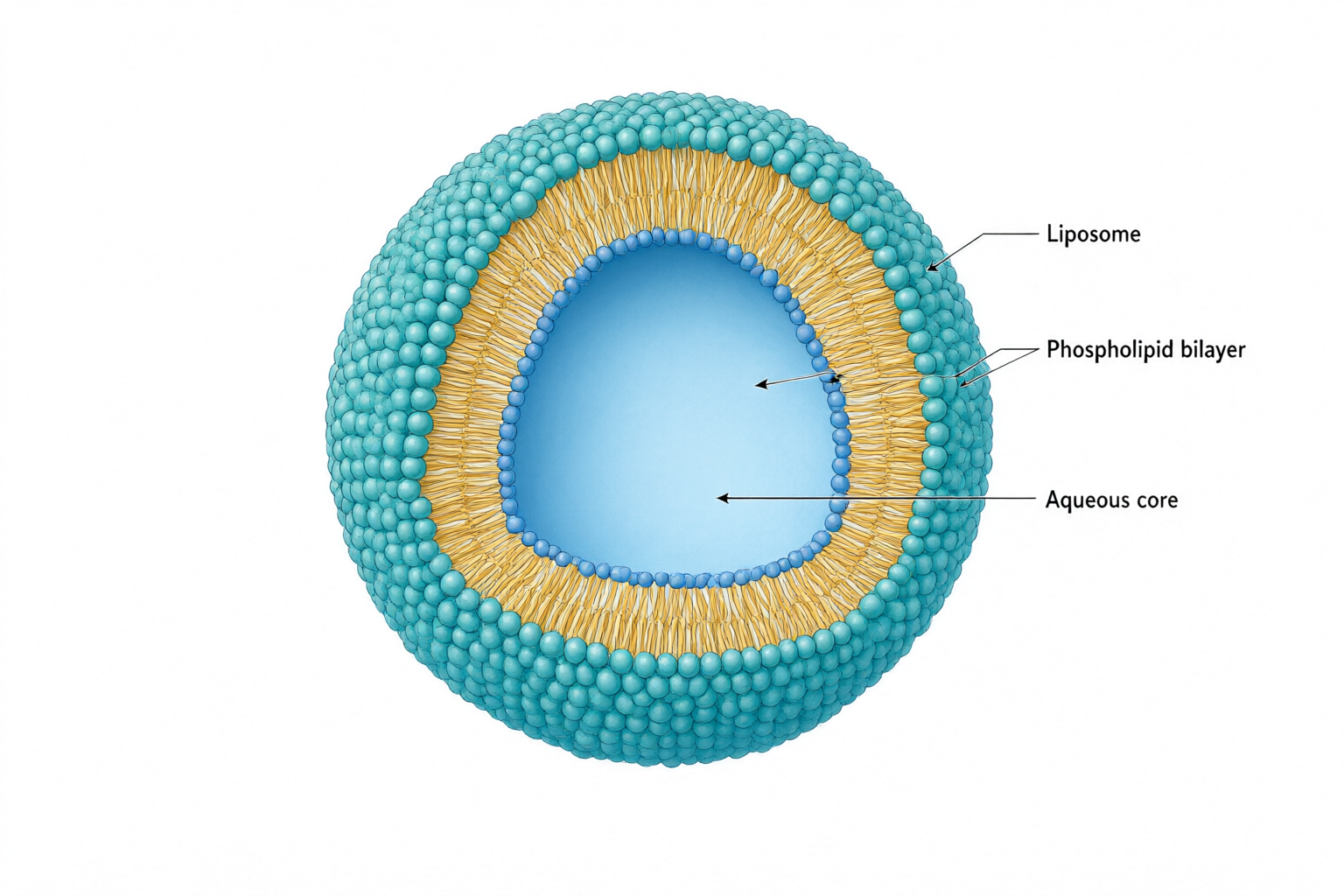
Cutaway liposome with a teal phospholipid surface, amber tails and an aqueous core, connected to three labels.
Original PNGqwen-image-3.0 · 1536 × 1024

Scientific image

Liposome cross-section

Review notes

The cutaway separates the aqueous core from the membrane, and all three requested labels are readable. One bilayer leader extends into the core instead of ending on the membrane. Correct that endpoint and verify the two-leaflet structure before use; molecular packing is schematic.

Input and confirmed content
Research concept
An educational cutaway of a spherical liposome showing a phospholipid bilayer surrounding an aqueous core. Use a three-quarter view with a clean wedge removed to reveal the interior. Keep the structure schematic, not molecularly resolved.
Objects to include
One liposome; phospholipid bilayer with hydrophilic heads and hydrophobic tails; aqueous core.
Relationships and arrows
The bilayer encloses the aqueous core. Hydrophilic heads face the surrounding water and the aqueous core; hydrophobic tails point inward toward each other within the bilayer. Three leader lines connect the labels to their objects. No transport arrows.
Exact labels · optional
Liposome; Phospholipid bilayer; Aqueous core
Visual instructions · optional
Minimal textbook diagram with ample whitespace and teal, blue and amber colors. Print ONLY the short labels explicitly listed in the content. No subtitles, paragraphs, footnotes or extra words. These are drawing directions, not text to display.
Original PNG
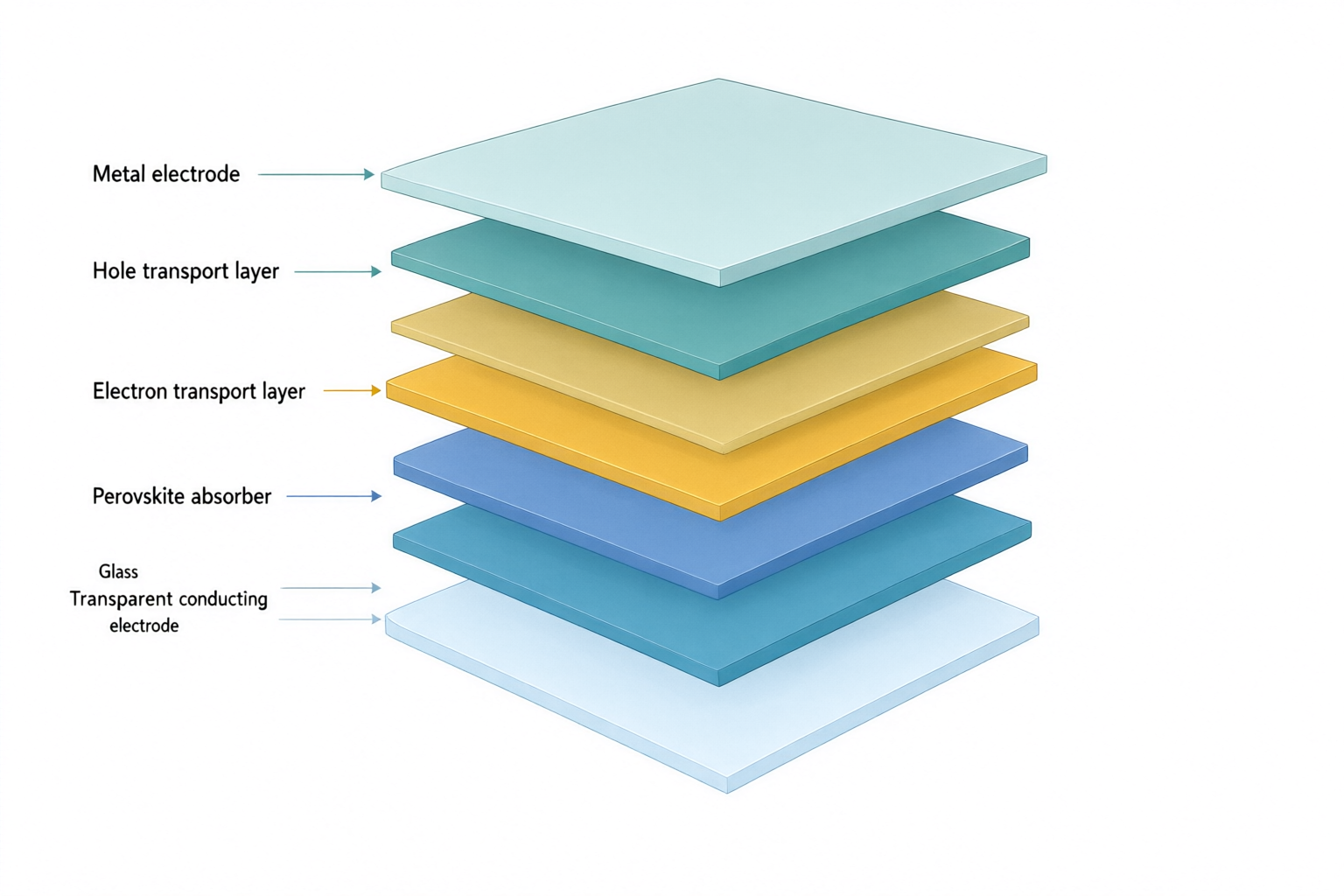
Exploded solar cell stack with labels for glass, transparent electrode, electron transport, perovskite, hole transport and metal.
Original PNGqwen-image-3.0 · 1536 × 1024

Externally redrawn reference

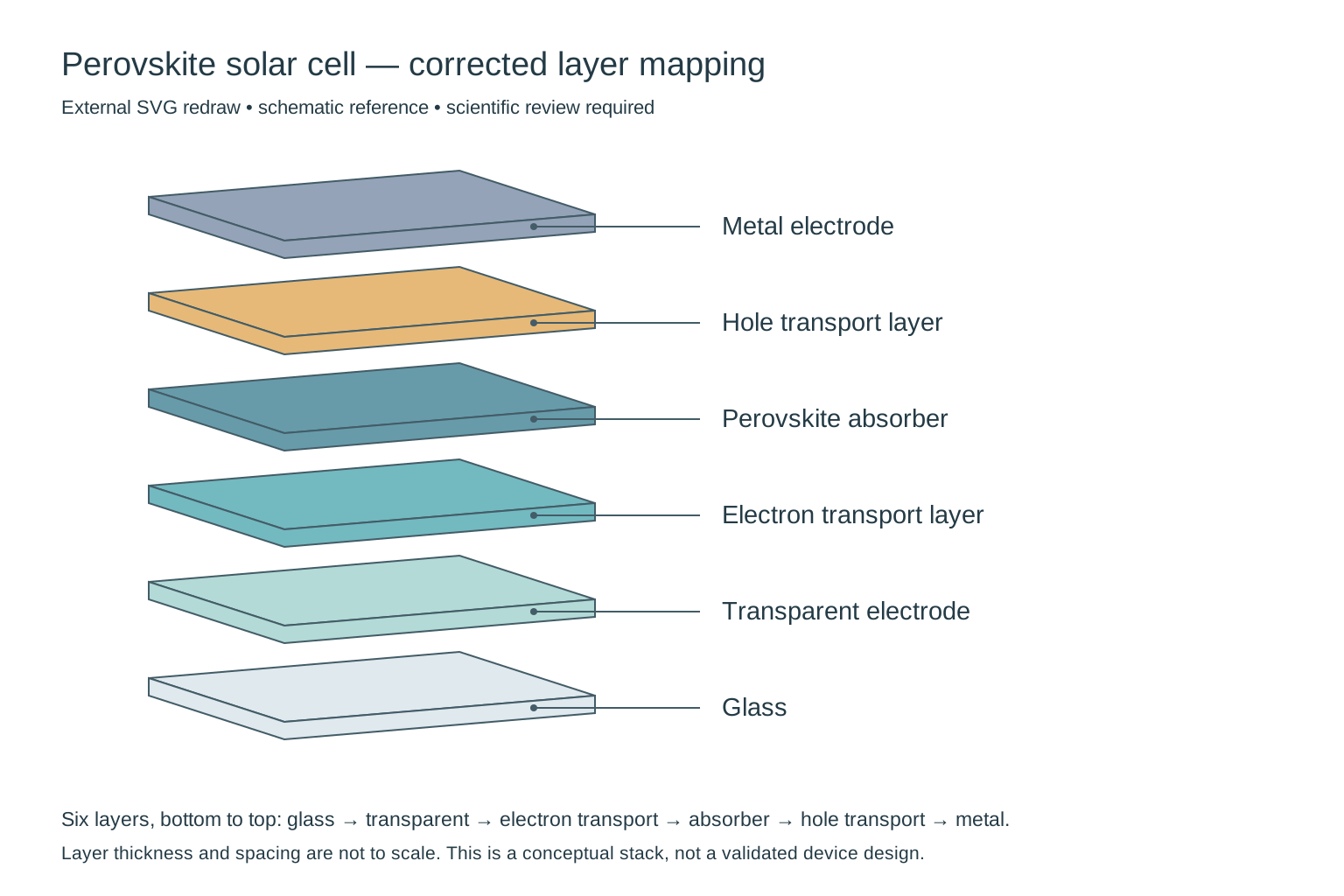
External redraw of exactly six solar-cell layers, from glass at the bottom to metal at the top, with each label connected to its own layer.
External SVG redraw for comparison, not a direct product output or an in-app editing feature. Still requires scientific review.

Scientific image

Perovskite solar cell layers

Review notes

Needs correction: the output adds a seventh slab and does not preserve the requested layer-to-label mapping. In particular, check the electron-transport/perovskite order and the two bottom labels. This is a composition draft, not a validated device architecture; thickness is not to scale.

Externally redrawn reference

Removed the extra slab, restored the requested six-layer sequence and attached each leader to its matching layer. Thickness and spacing remain schematic; this does not validate a particular device architecture.

Input and confirmed content
Research concept
An exploded three-quarter cutaway of a conceptual planar perovskite solar cell. Show exactly six separate solid flat slabs, one slab per material, with equal gaps and no internal textures or additional sublayers.
Objects to include
Glass substrate; transparent conducting electrode; electron transport layer; perovskite absorber; hole transport layer; metal electrode.
Relationships and arrows
Stack exactly six layers in the listed order, from glass at the bottom to metal at the top. Connect each label to the middle of its corresponding slab using a thin leader line without arrowheads. Layer thickness is schematic, not to scale.
Exact labels · optional
Glass; Transparent electrode; Electron transport layer; Perovskite absorber; Hole transport layer; Metal electrode
Visual instructions · optional
Minimal textbook diagram with ample whitespace and teal, blue and amber colors. Print ONLY the short labels explicitly listed in the content. No subtitles, paragraphs, footnotes or extra words. These are drawing directions, not text to display.
Original PNG

START WITH AN IDEA

Start with a scientific scene

These are demonstration inputs, not generated results or customer research.

FROM DESCRIPTION TO DRAFT

Build a scientific image from a written scene

Start with the idea your audience needs to understand, then list the objects and their spatial relationships. Use visual instructions for background, emphasis and white space. Choose a square, landscape or portrait size for your intended material, confirm the description, and review the generated image before downloading.

  1. Describe the scientific scene and key objects
  2. Confirm the relationships and visual instructions
  3. Generate, review the science, and download

Graphical abstract

Need a graphical abstract?

Turn your research summary into a clear visual story. Review the question, method and findings before generating your graphical abstract.

Create a graphical abstract

Check structure and composition

Check object placement, layer order, cutaway orientation and label leader lines. A convincing scene does not establish accurate scale or measured structure. Use the diagram tool when the main message depends on ordered steps or causal arrows.

Review the scientific meaning and text, and check your target journal's AI, licensing and disclosure requirements. Generated images are not automatically accurate, approved by a journal, or suitable as experimental evidence.

Need steps or relationship arrows? Try scientific illustration →

Frequently asked questions

What scientific images can I generate?

You can describe conceptual scenes for research presentations, posters and educational materials, such as an environmental system or an observation setup. Outputs are illustrative drafts. They are not microscope images, scans, satellite observations or other measured evidence.

How do I describe an image for a slide or poster?

State the scene, the objects that must appear and how they are arranged. In visual instructions, describe the background and any space needed for surrounding slide or poster text. Choose one of the available image sizes and check the composition after generation.

Can I edit text and labels?

You can revise the description and exact labels before generating another image. Direct editing of pixels, text layers, vectors and individual elements is not available in this version.

Which export formats and sizes are supported?

PNG downloads are available at 1024 × 1024, 1536 × 1024 and 1024 × 1536 pixels. SVG and PPTX exports are not offered. Download promptly because provider image links expire.