FigureDraft

A WORKSPACE FOR RESEARCH COMMUNICATION

AI Graphical Abstract Generator

Turn your research summary into a clear visual story. Review the question, method and findings before generating your graphical abstract.

For explanatory illustrations—not experimental evidence.

01 / Organize your research

The text model selects exact excerpts from your summary. Missing information remains empty for you to supply. No PDF upload is needed.

Extraction sends your summary, and image generation your confirmed description, to the selected provider. Submit only research you are authorized to share with that provider. Current processing provider: Qianwen AI (maas.qianwenaiapi.com).Privacy Policy

Each successful image uses 1 credit, including new versions. Failed tasks release reserved credits. PNG download uses no additional credits.

Generated graphical abstract examples

The original PNGs are actual FigureDraft outputs from English demonstration inputs. External redraws are labeled separately. Review notes describe visible limitations; none of these examples have received independent scientific review.

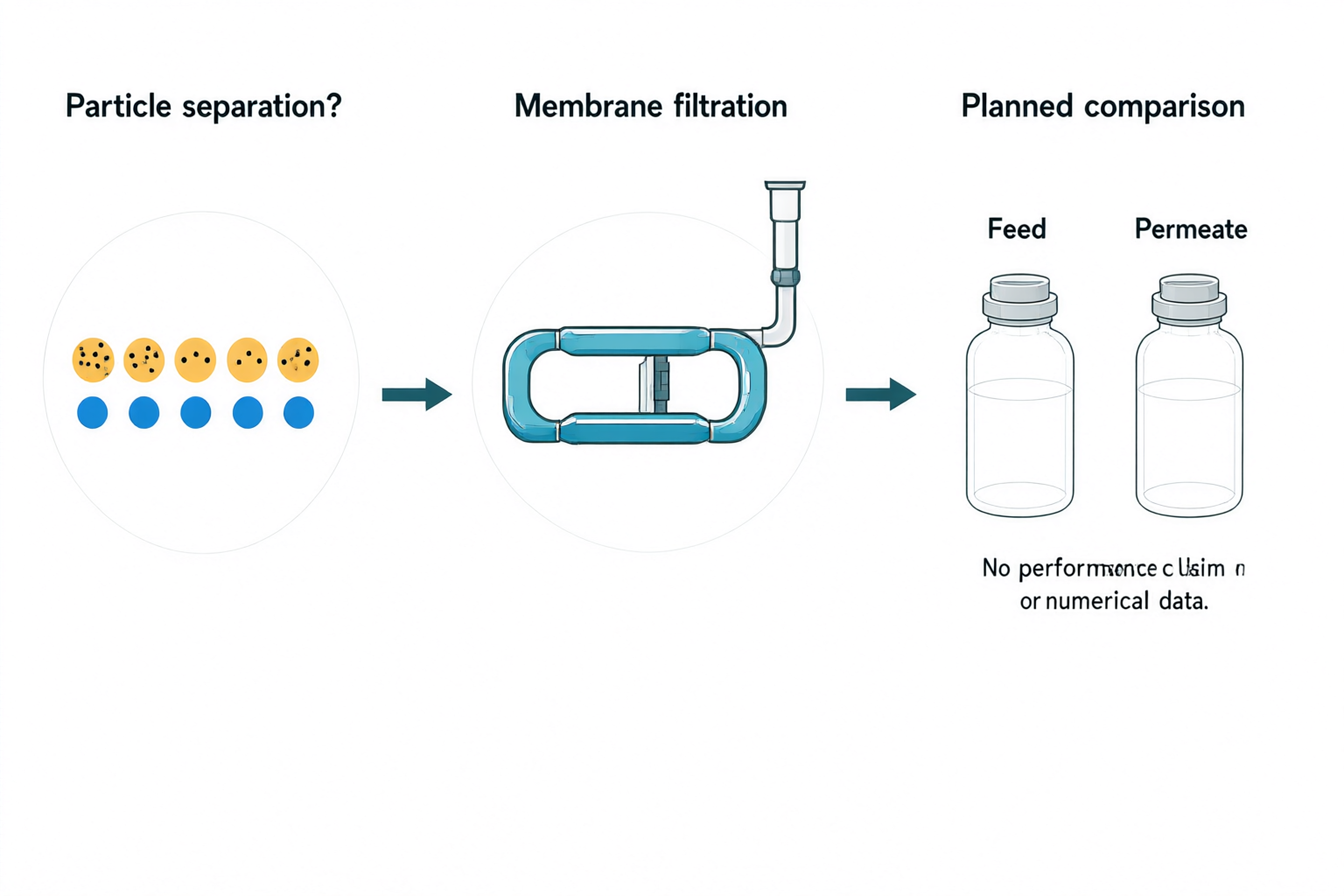
Membrane filtration study design showing a particle-separation question, filtration apparatus and a planned feed-versus-permeate comparison.
Original PNGqwen-image-3.0 · 1536 × 1024

Externally redrawn reference
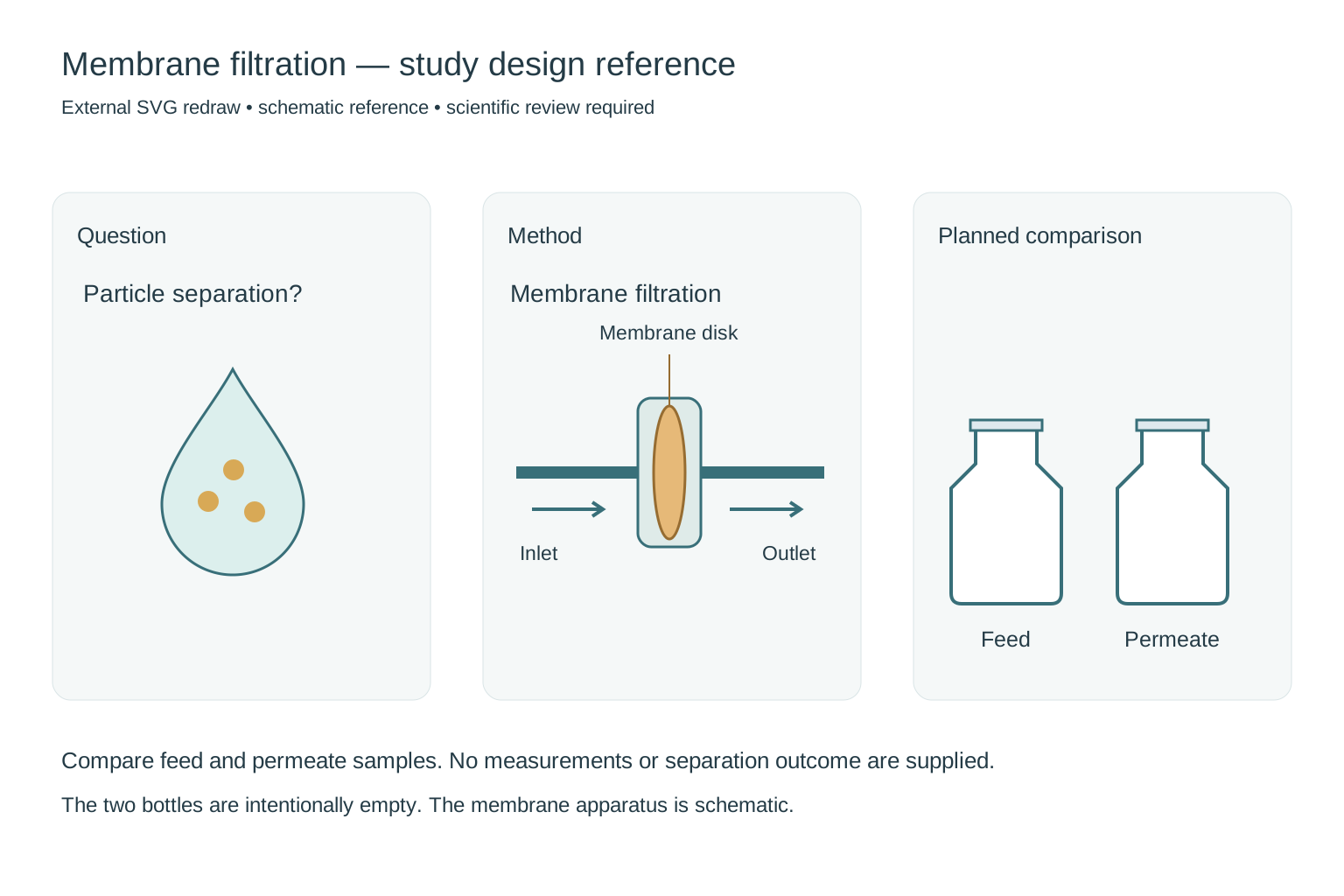
External redraw showing a clearly labeled membrane disk between inlet and outlet, followed by identical empty Feed and Permeate bottles.
External SVG redraw for comparison, not a direct product output or an in-app editing feature. Still requires scientific review.

Graphical abstract

Membrane filtration study design

Review notes

The three panels and matching Feed/Permeate bottles communicate a planned comparison. Needs correction: the apparatus does not clearly identify the requested membrane disk and extra text below the bottles is malformed. Redraw the setup and remove the extra text before use. No separation result was supplied.

Externally redrawn reference

Redrew and labeled the membrane disk, inlet and outlet. Replaced malformed text with readable labels and kept both comparison bottles empty. This remains a study design without findings.

Input and confirmed content
Research question
Particle separation? A water droplet containing three small particle symbols.
Method
Membrane filtration: a flat membrane disk between an inlet and an outlet tube, shown as a schematic apparatus.
Main findings
Planned comparison, with no results yet: two identical empty outline sample bottles labeled Feed and Permeate. Keep both bottles unfilled and identical. No performance claim or numerical data.
Visual instructions · optional
Minimal textbook diagram with ample whitespace and teal, blue and amber colors. Print ONLY the short labels explicitly listed in the content. No subtitles, paragraphs, footnotes or extra words. These are drawing directions, not text to display. The ONLY visible text is: "Particle separation?", "Membrane filtration", "Planned comparison", "Feed", "Permeate". Use flat vector-style icons in three horizontal panels.
Original PNG
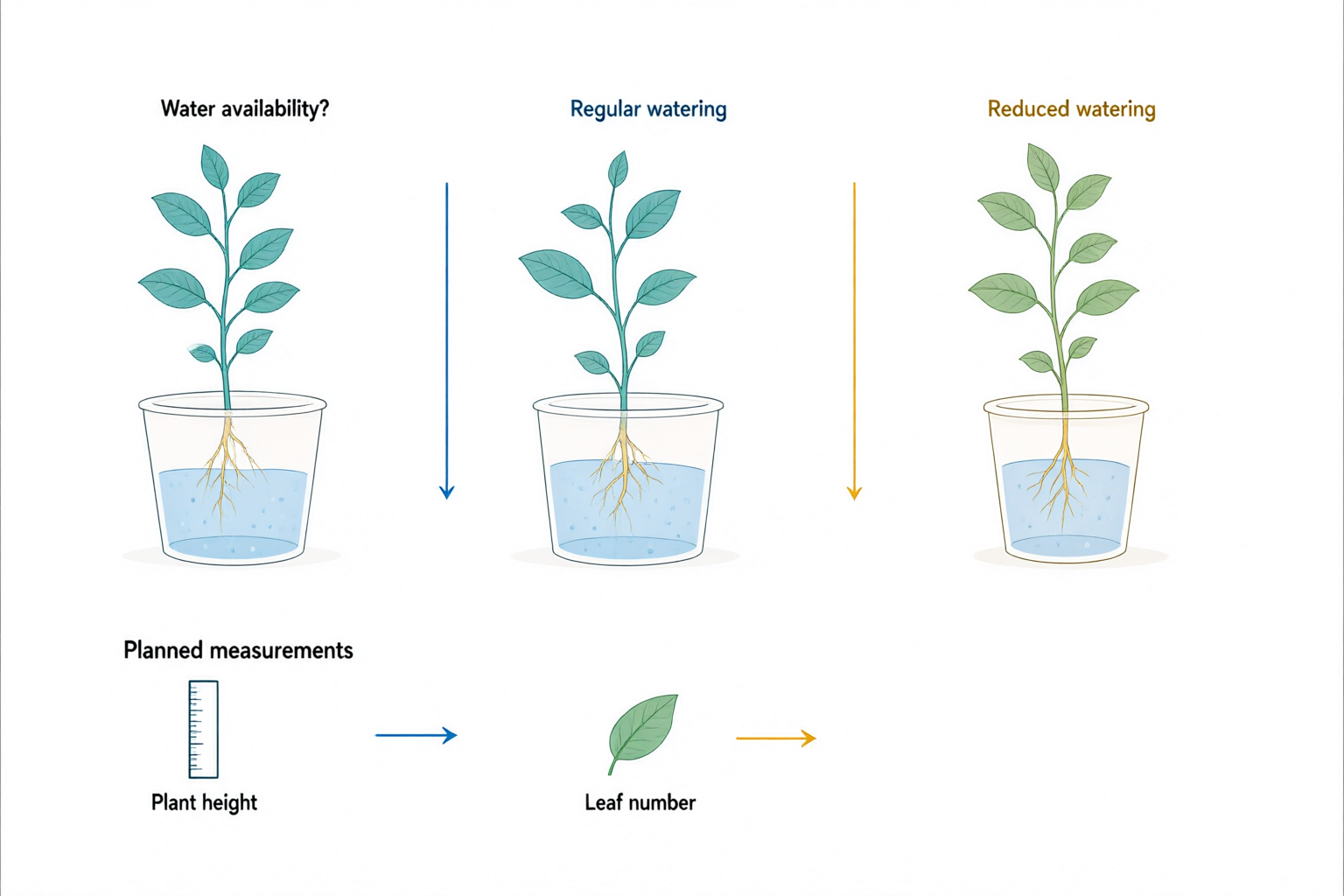
Three schematic plants under water-availability and watering labels, with a ruler and leaf representing planned measurements.
Original PNGqwen-image-3.0 · 1536 × 1024

Externally redrawn reference

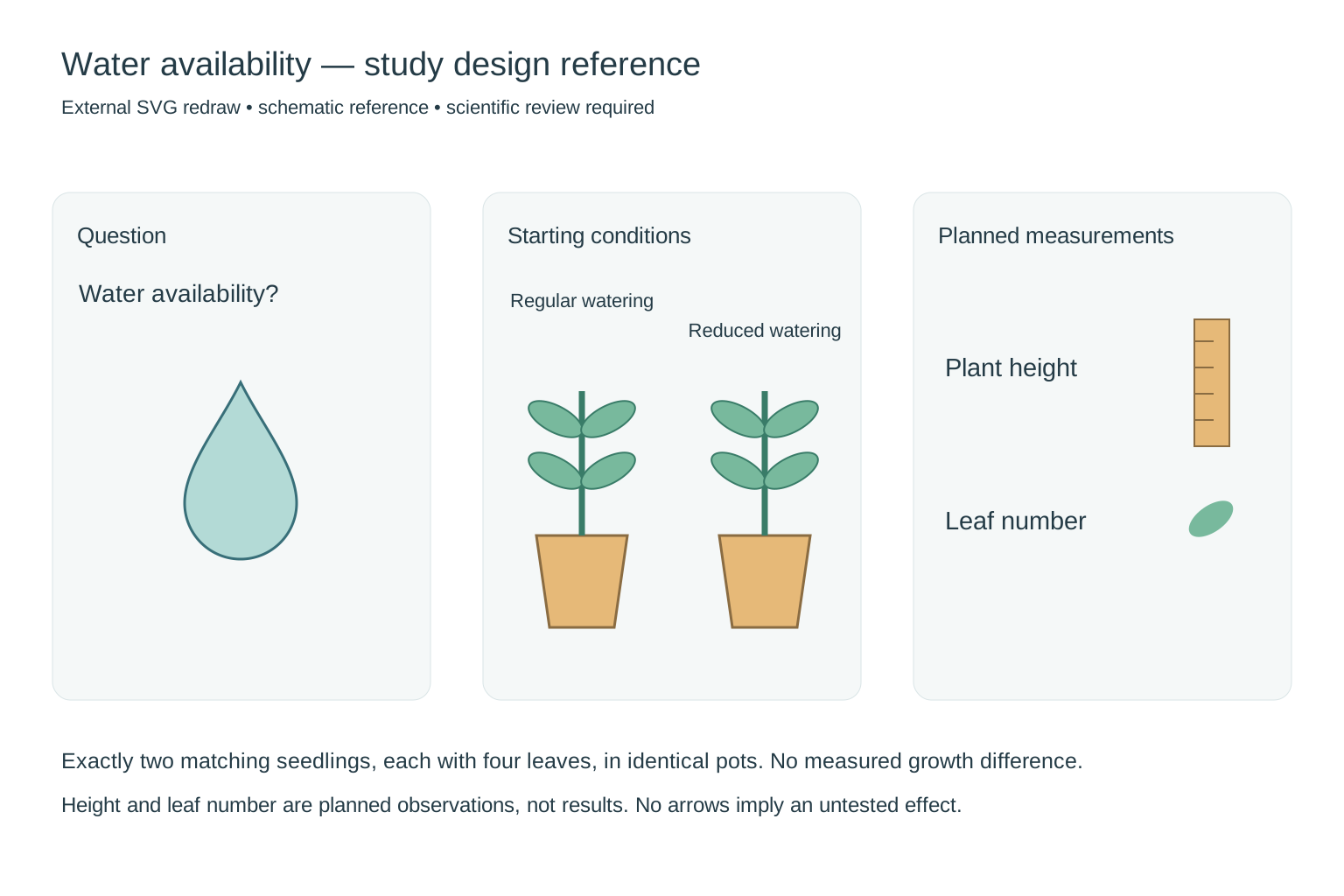
External redraw of two identical four-leaf seedlings in matching pots under regular and reduced watering, with planned height and leaf-count observations.
External SVG redraw for comparison, not a direct product output or an in-app editing feature. Still requires scientific review.

Graphical abstract

Plant water-stress study design

Review notes

The planned measurement labels are readable and no numerical results are shown. Needs correction: the output uses three plants and more than four leaves per seedling, rather than the requested two matching four-leaf seedlings in pots. Extra arrows near the measurement icons have no defined meaning. These are not observed growth differences.

Externally redrawn reference

Reduced the setup to exactly two matching four-leaf seedlings, removed unexplained arrows and separated starting conditions from planned observations. No growth response or treatment result is claimed.

Input and confirmed content
Research question
Water availability? A water droplet beside a leaf.
Method
Two identical healthy seedlings, each with four leaves and the same height in matching pots. Label one Regular watering and the other Reduced watering. They represent the starting conditions of a proposed experiment.
Main findings
Planned measurements, with no findings yet: a ruler icon labeled Plant height and a leaf icon labeled Leaf number. No numbers, graphs or different plant sizes.
Visual instructions · optional
Minimal textbook diagram with ample whitespace and teal, blue and amber colors. Print ONLY the short labels explicitly listed in the content. No subtitles, paragraphs, footnotes or extra words. These are drawing directions, not text to display. The ONLY visible text is: "Water availability?", "Regular watering", "Reduced watering", "Planned measurements", "Plant height", "Leaf number". Use flat vector-style icons in three horizontal panels.
Original PNG
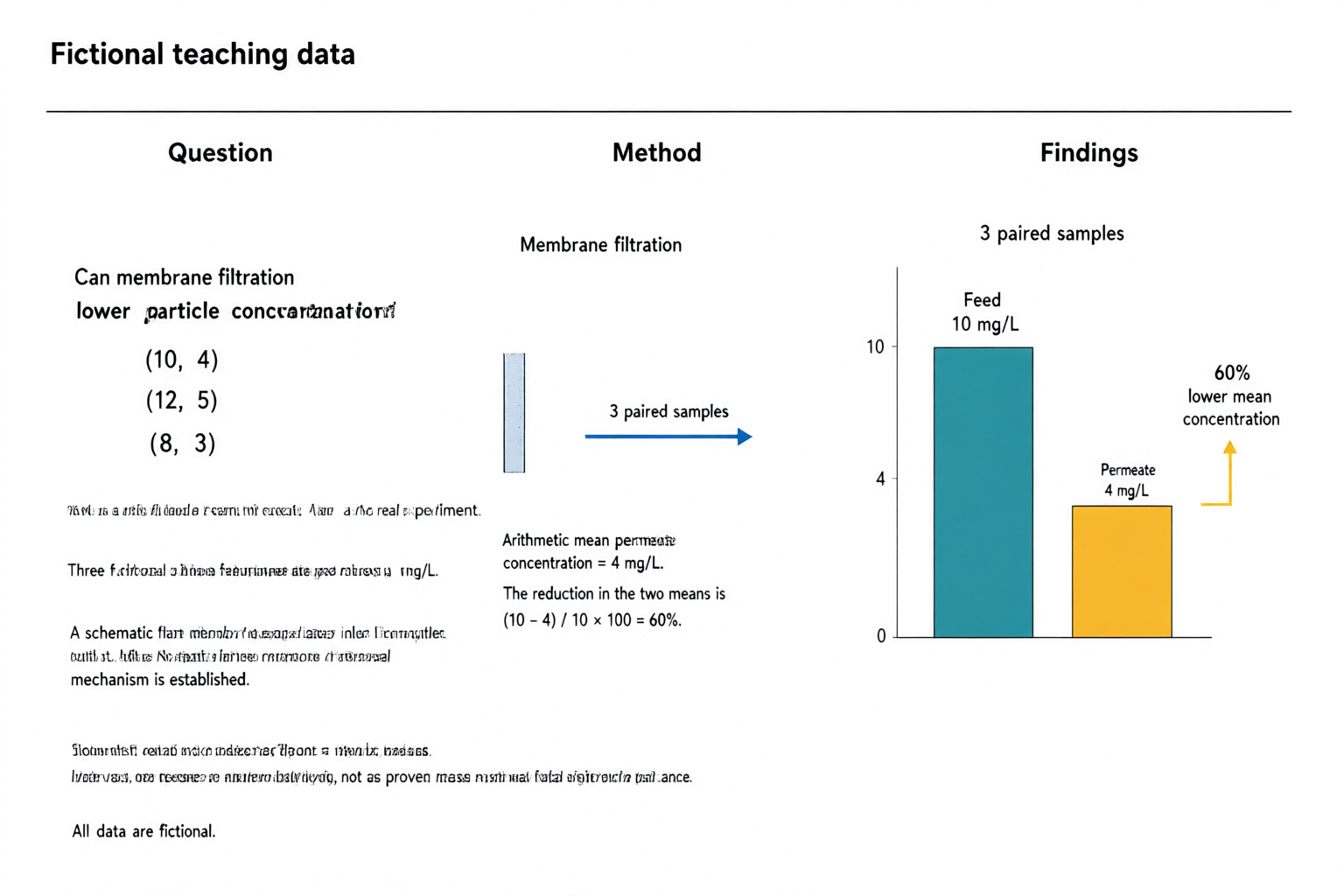
AI-generated fictional teaching abstract with question, filtration method and a zero-baseline chart showing feed at 10 mg/L and permeate at 4 mg/L, with a 60 percent lower mean.
Original PNGqwen-image-3.0 · 1536 × 1024

Externally redrawn reference

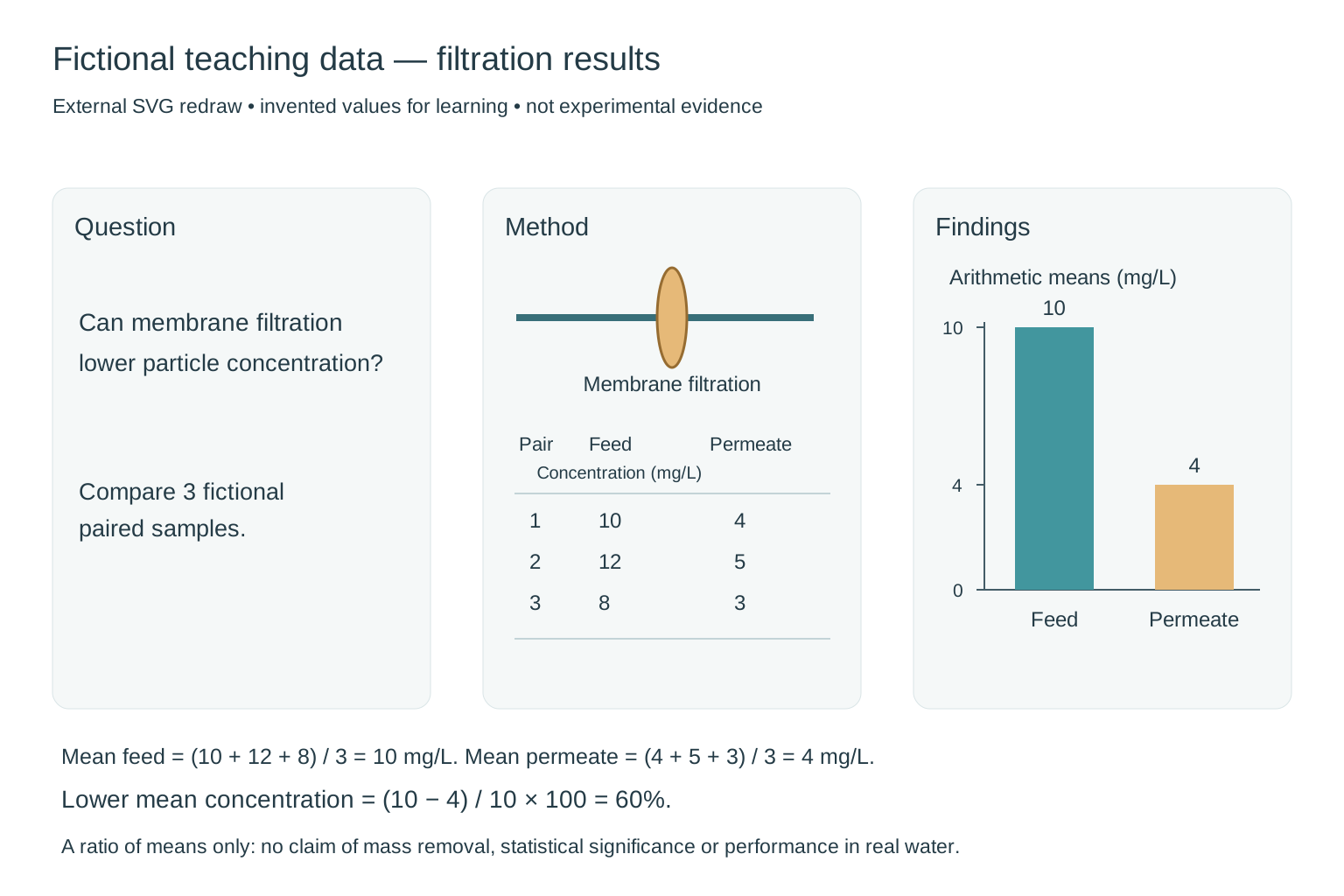
External redraw of a fictional filtration abstract: three paired concentrations 10/4, 12/5 and 8/3 mg/L, arithmetic means 10 and 4, and a chart with a zero baseline and 60 percent lower mean concentration.
External SVG redraw for comparison, not a direct product output or an in-app editing feature. Still requires scientific review.

Graphical abstract

Filtration results — fictional teaching data

Review notes

Fictional teaching data, not experimental evidence. The three feed/permeate pairs are (10, 4), (12, 5), (8, 3) mg/L. Their means are 10 and 4 mg/L, so (10 − 4) / 10 × 100 = 60% lower mean concentration. The original chart preserves these values and a zero baseline, but the extra small text is malformed and the membrane apparatus is incomplete. The 60% is a ratio of means, not proof of mass removal, a mean of individual percentages or statistical significance.

Externally redrawn reference

Replaced malformed text with a clear question, a schematic membrane and the complete paired teaching dataset. Redrew the two bars on a shared zero baseline with heights in a 10:4 ratio. Both the figure and its caption identify the data as fictional; no error bars or significance claim are invented.

Input and confirmed content
Research question
Can membrane filtration lower particle concentration? This is a fictional teaching example, not a real experiment.
Method
Three fictional paired feed/permeate concentrations in mg/L: (10, 4), (12, 5), (8, 3). A schematic flat membrane separates inlet from outlet. No statistical inference or removal mechanism is established.
Main findings
Arithmetic mean feed concentration = 10 mg/L; arithmetic mean permeate concentration = 4 mg/L. The reduction in the two means is (10 - 4) / 10 × 100 = 60%. Show this as lower mean concentration, not as proven mass removal or statistical significance. All data are fictional.
Visual instructions · optional
Minimal textbook diagram with ample whitespace and teal, blue and amber colors. Print ONLY the short labels explicitly listed in the content. No subtitles, paragraphs, footnotes or extra words. These are drawing directions, not text to display. Prominently label the whole figure "Fictional teaching data". Three panels: Question, Method, Findings. ONLY additional labels: "Membrane filtration", "3 paired samples", "Feed: 10 mg/L", "Permeate: 4 mg/L", "60% lower mean concentration". Use a simple two-bar chart with a zero baseline, feed bar height 10 and permeate bar height 4. No other numerical claims.
Original PNG

START WITH AN IDEA

Graphical abstract examples: a starter summary

These are demonstration inputs, not generated results or customer research.

FROM DESCRIPTION TO DRAFT

How to create a graphical abstract

Paste your summary, extract exact passages, and check the research question, method and findings. Supply any missing information, choose a layout, then confirm the content before generating. The graphical abstract maker uses your confirmed points to organize the image.

  1. Paste the abstract or research summary
  2. Review the extracted question, method and findings
  3. Generate, review the science, and download

Review the science before you export

Review every label, arrow, number and scientific claim before use. This image is a draft, not experimental evidence.

Check each excerpt against the summary. Preserve numbers, units and comparison directions. Fill missing information from your research before continuing.

Review the scientific meaning and text, and check your target journal's AI, licensing and disclosure requirements. Generated images are not automatically accurate, approved by a journal, or suitable as experimental evidence.

Change the wording, layout instructions or labels and generate a new image. This first version produces raster PNG images; it does not provide direct text, vector or element editing. Each new generation can change the full composition.

Need a standalone scientific illustration? Try the figure generator →

Frequently asked questions

What should I include in my research summary?

Include the research question, method and actual findings. Preserve the numbers, units and comparisons you want to communicate. Supply missing information yourself; the tool will not invent a finding to complete the abstract.

Can I change the extracted research points?

Yes. The model selects original passages for you to review. Edit each field against your research, choose the visual organization, and confirm the content before generating. You can also organize the points manually.

Can I edit text and labels?

You can revise the description and exact labels before generating another image. Direct editing of pixels, text layers, vectors and individual elements is not available in this version.

Which export formats and sizes are supported?

PNG downloads are available at 1024 × 1024, 1536 × 1024 and 1024 × 1536 pixels. SVG and PPTX exports are not offered. Download promptly because provider image links expire.