FigureDraft

A WORKSPACE FOR RESEARCH COMMUNICATION

AI Scientific Illustration Generator

Make a method or scientific relationship easier to follow. Define the objects, arrows and exact labels, then generate an explanatory illustration for your readers to review.

For explanatory illustrations—not experimental evidence.

01 / Explain the method or relationship

Break the explanation into its essential objects and steps. Specify what each arrow means, which direction it points and the exact labels to include. Add panel order or emphasis as visual instructions. After generating, check that the sequence and relationships still match your intended scientific explanation.

Labels, image size & visual instructions

Extraction sends your summary, and image generation your confirmed description, to the selected provider. Submit only research you are authorized to share with that provider. Current processing provider: Qianwen AI (maas.qianwenaiapi.com).Privacy Policy

Each successful image uses 1 credit, including new versions. Failed tasks release reserved credits. PNG download uses no additional credits.

Generated scientific illustration examples

The original PNGs are actual FigureDraft outputs from English demonstration inputs. External redraws are labeled separately. Review notes describe visible limitations; none of these examples have received independent scientific review.

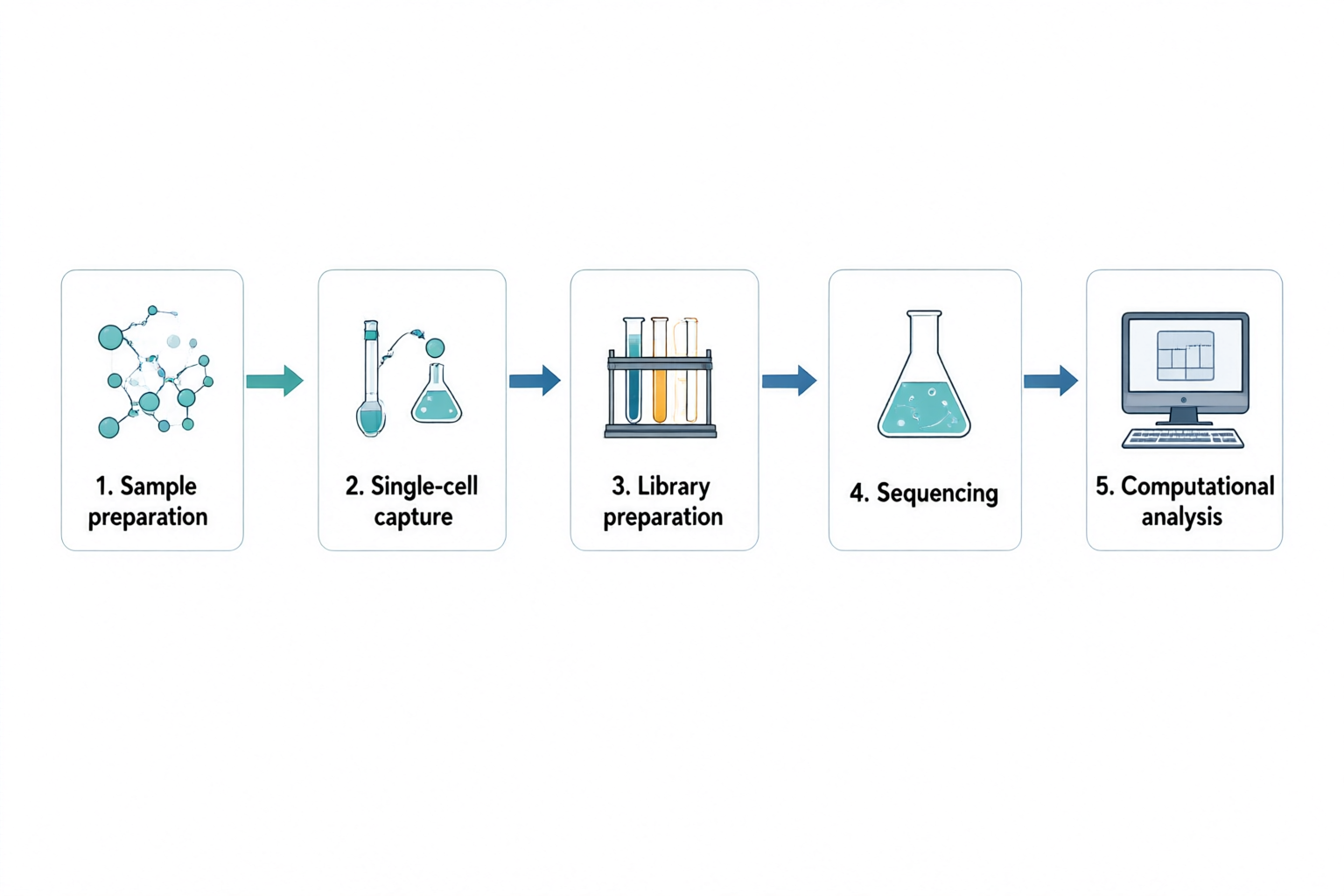
Five panels connected left to right: sample preparation, single-cell capture, library preparation, sequencing and computational analysis.
Original PNGqwen-image-3.0 · 1536 × 1024

Scientific illustration

Single-cell RNA sequencing workflow

Review notes

The five labels and four connecting arrows follow the requested left-to-right order. The sequencing stage uses a generic flask rather than a sequencing instrument. Replace that icon for a technical methods figure; this overview does not specify an assay protocol or show measured data.

Input and confirmed content
Research concept
A high-level five-step workflow for single-cell RNA sequencing. Show a left-to-right sequence with numbered panels and one clear arrow between neighboring steps. Do not depict real sequencing measurements or an actual clustering result.
Objects to include
Sample preparation; single-cell capture; library preparation; sequencing; computational analysis.
Relationships and arrows
Sample preparation leads to single-cell capture, then library preparation, sequencing and computational analysis. Use simple lab icons and a computer icon for the final stage. No branches or backward arrows.
Exact labels · optional
1. Sample preparation; 2. Single-cell capture; 3. Library preparation; 4. Sequencing; 5. Computational analysis
Visual instructions · optional
Minimal textbook diagram with ample whitespace and teal, blue and amber colors. Print ONLY the short labels explicitly listed in the content. No subtitles, paragraphs, footnotes or extra words. These are drawing directions, not text to display.
Original PNG
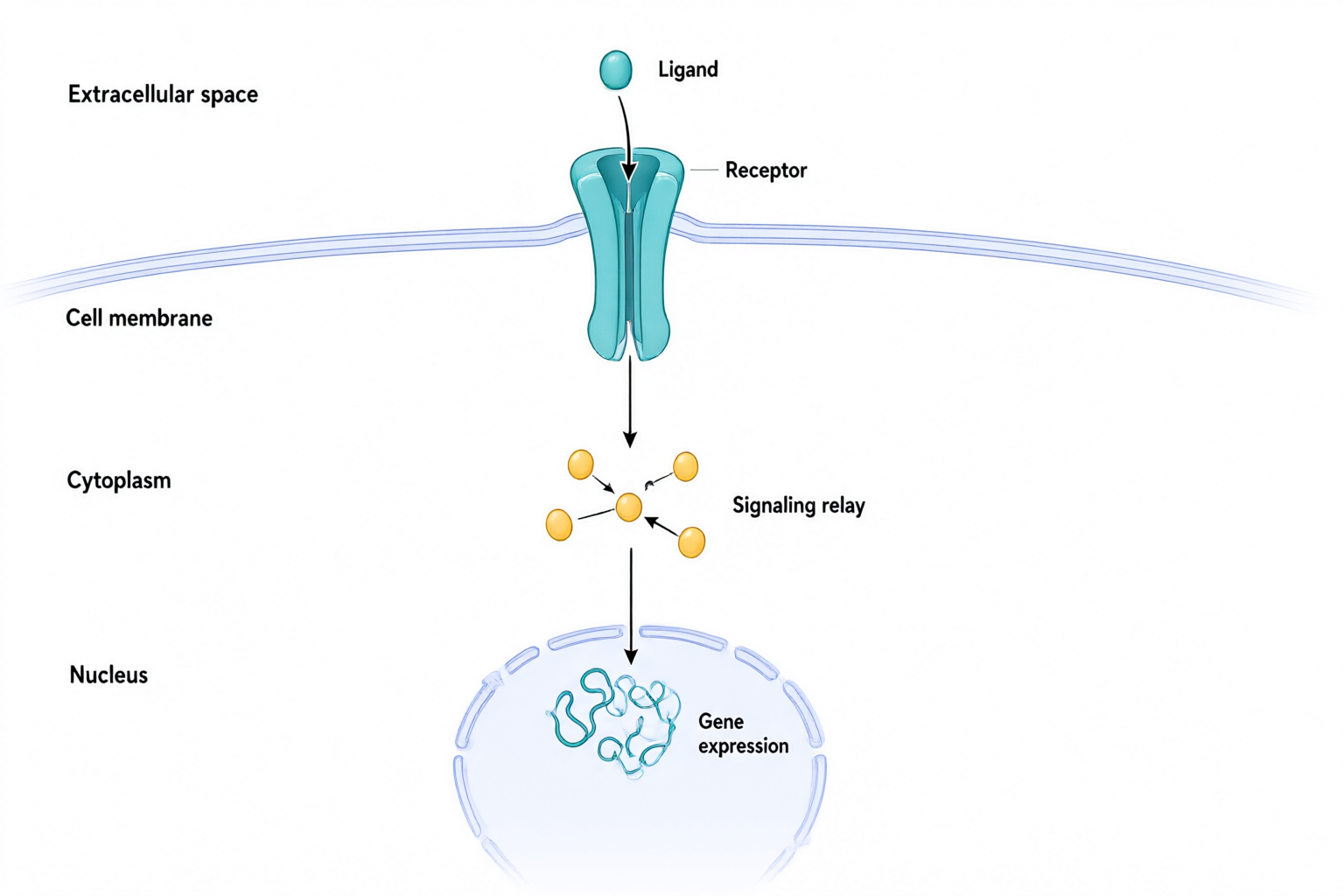
Extracellular ligand above a membrane receptor, with arrows through a cytoplasmic relay toward gene expression in the nucleus.
Original PNGqwen-image-3.0 · 1536 × 1024

Scientific illustration

Receptor-to-nucleus signaling

Review notes

The ligand is outside the membrane and the main arrows run from the receptor through a relay toward the nucleus. Small relay connections remain conceptual. No proteins, measured response or specific biological pathway are identified; verify every causal connection against the actual research.

Input and confirmed content
Research concept
A generic conceptual diagram of ligand-activated signaling from a cell-surface receptor to the nucleus. Use three labeled compartments and a clear downward reading order. Do not name a specific protein or imply that this schematic represents every signaling pathway.
Objects to include
Extracellular ligand; cell membrane with a transmembrane receptor; intracellular signaling relay; nucleus containing a gene-expression symbol.
Relationships and arrows
Ligand binds to the extracellular portion of the receptor. An arrow from the intracellular portion points to a signaling relay in the cytoplasm. Another arrow points from the relay into the nucleus toward the gene-expression symbol. The ligand remains outside the cell.
Exact labels · optional
Extracellular space; Ligand; Receptor; Cell membrane; Cytoplasm; Signaling relay; Nucleus; Gene expression
Visual instructions · optional
Minimal textbook diagram with ample whitespace and teal, blue and amber colors. Print ONLY the short labels explicitly listed in the content. No subtitles, paragraphs, footnotes or extra words. These are drawing directions, not text to display.
Original PNG

START WITH AN IDEA

Try a method or relationship prompt

These are demonstration inputs, not generated results or customer research.

FROM DESCRIPTION TO DRAFT

Turn objects and relationships into an explanation

Break the explanation into its essential objects and steps. Specify what each arrow means, which direction it points and the exact labels to include. Add panel order or emphasis as visual instructions. After generating, check that the sequence and relationships still match your intended scientific explanation.

  1. Describe the method and objects to illustrate
  2. Check the sequence, arrow directions and labels
  3. Generate, review the science, and download

Graphical abstract

Need a graphical abstract?

Turn your research summary into a clear visual story. Review the question, method and findings before generating your graphical abstract.

Create a graphical abstract

Check sequence and relationships

Follow each arrow from its source to its destination. Check step order, branches, compartment boundaries and label placement. An arrow must not imply a cause or measurement that your input did not establish.

Review the scientific meaning and text, and check your target journal's AI, licensing and disclosure requirements. Generated images are not automatically accurate, approved by a journal, or suitable as experimental evidence.

Frequently asked questions

Which scientific explanations can I illustrate?

Use a description to illustrate a method workflow, an interaction or a conceptual mechanism. Specify the relationships yourself and review the result. The tool does not infer a validated mechanism or verify scientific accuracy from a short prompt.

How should I specify arrows, stages and labels?

List the objects, write the stage order and explain what each arrow represents in the relationships field. Put required wording in the exact labels field. Use visual instructions for panel arrangement. Check rendered text and arrow directions before use; generation may need another attempt.

Can I edit text and labels?

You can revise the description and exact labels before generating another image. Direct editing of pixels, text layers, vectors and individual elements is not available in this version.

Which export formats and sizes are supported?

PNG downloads are available at 1024 × 1024, 1536 × 1024 and 1024 × 1536 pixels. SVG and PPTX exports are not offered. Download promptly because provider image links expire.