FigureDraft

연구 소통을 위한 작업 공간

AI 과학 이미지 생성기

연구 개념을 시각화하는 첫걸음입니다. 과학적 장면과 핵심 대상을 지정하고 발표, 포스터, 교재에 사용할 이미지 초안을 생성하세요.

설명용 일러스트이며 실험 증거가 아닙니다.

01 / 과학 이미지 설명

독자가 이해해야 할 개념을 정한 뒤 대상과 공간적 관계를 나열하세요. 시각적 지침에 배경, 강조점, 여백을 지정하세요. 용도에 따라 정사각형, 가로형, 세로형을 선택하고 설명을 확인한 뒤 생성된 이미지를 검토하고 다운로드하세요.

라벨, 이미지 크기 및 시각적 지침

추출 시 요약이, 이미지 생성 시 확인된 설명이 선택한 제공업체로 전송됩니다. 해당 제공업체와 공유할 권한이 있는 연구만 제출하세요. 현재 처리 제공업체: Qianwen AI (maas.qianwenaiapi.com).개인정보 처리방침

새 버전을 포함해 성공적으로 생성된 이미지마다 크레딧 1개를 사용합니다. 실패한 작업은 예약된 크레딧을 해제합니다. PNG 다운로드에는 추가 크레딧이 들지 않습니다.

생성된 과학 이미지 예시

원본 PNG는 영어 시연 입력으로 FigureDraft가 실제 생성한 결과입니다. 외부에서 다시 그린 그림은 별도로 표시합니다. 검토 메모는 눈에 보이는 문제와 한계를 설명하며, 모든 예시는 독립적인 과학적 검토를 받지 않았습니다.

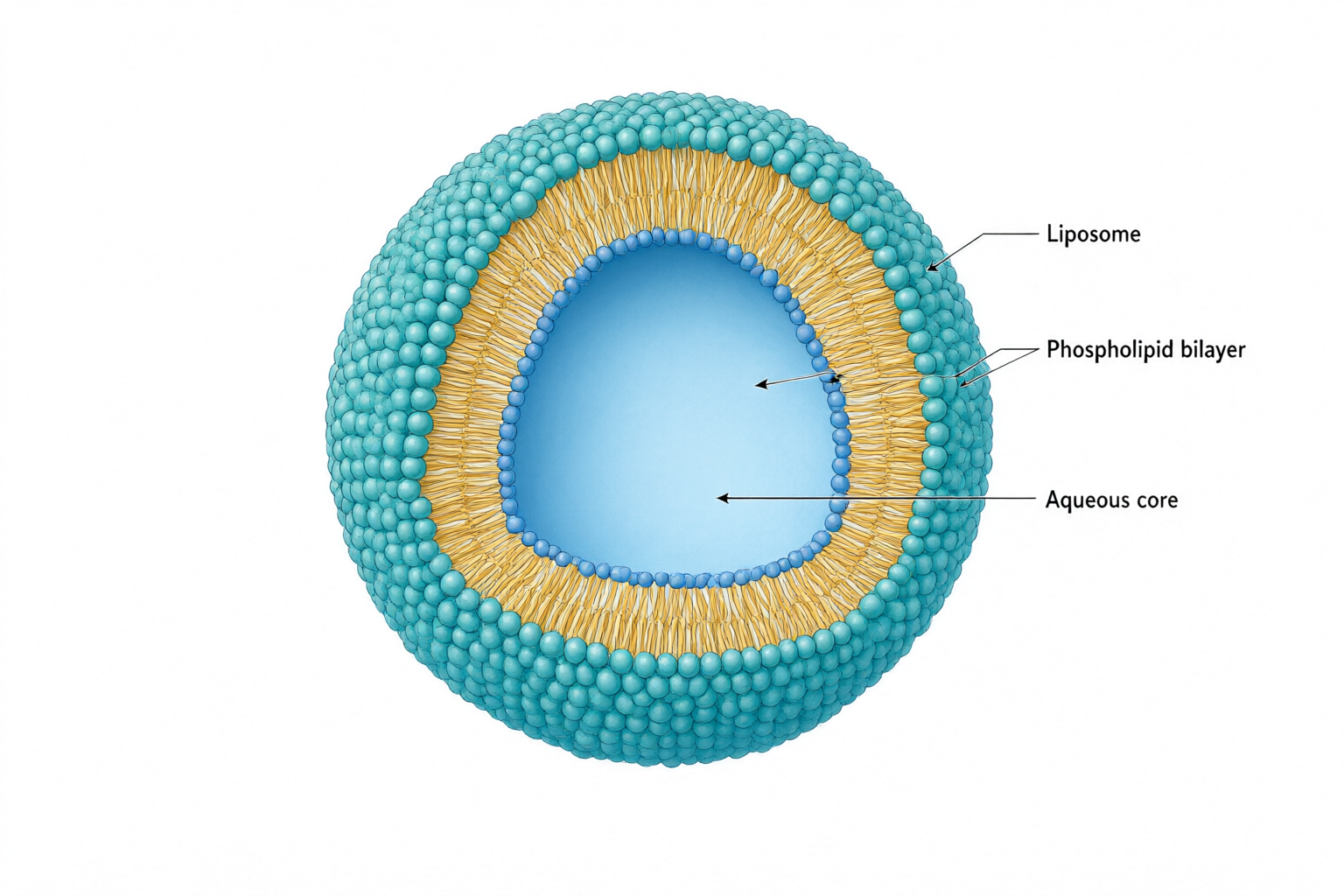
Cutaway liposome with a teal phospholipid surface, amber tails and an aqueous core, connected to three labels.
원본 PNGqwen-image-3.0 · 1536 × 1024

과학 이미지

Liposome cross-section

검토 메모

The cutaway separates the aqueous core from the membrane, and all three requested labels are readable. One bilayer leader extends into the core instead of ending on the membrane. Correct that endpoint and verify the two-leaflet structure before use; molecular packing is schematic.

입력 및 확인한 내용
연구 개념
An educational cutaway of a spherical liposome showing a phospholipid bilayer surrounding an aqueous core. Use a three-quarter view with a clean wedge removed to reveal the interior. Keep the structure schematic, not molecularly resolved.
포함할 대상
One liposome; phospholipid bilayer with hydrophilic heads and hydrophobic tails; aqueous core.
관계와 화살표
The bilayer encloses the aqueous core. Hydrophilic heads face the surrounding water and the aqueous core; hydrophobic tails point inward toward each other within the bilayer. Three leader lines connect the labels to their objects. No transport arrows.
정확한 라벨 문구 · 선택 사항
Liposome; Phospholipid bilayer; Aqueous core
시각적 지침 · 선택 사항
Minimal textbook diagram with ample whitespace and teal, blue and amber colors. Print ONLY the short labels explicitly listed in the content. No subtitles, paragraphs, footnotes or extra words. These are drawing directions, not text to display.
원본 PNG
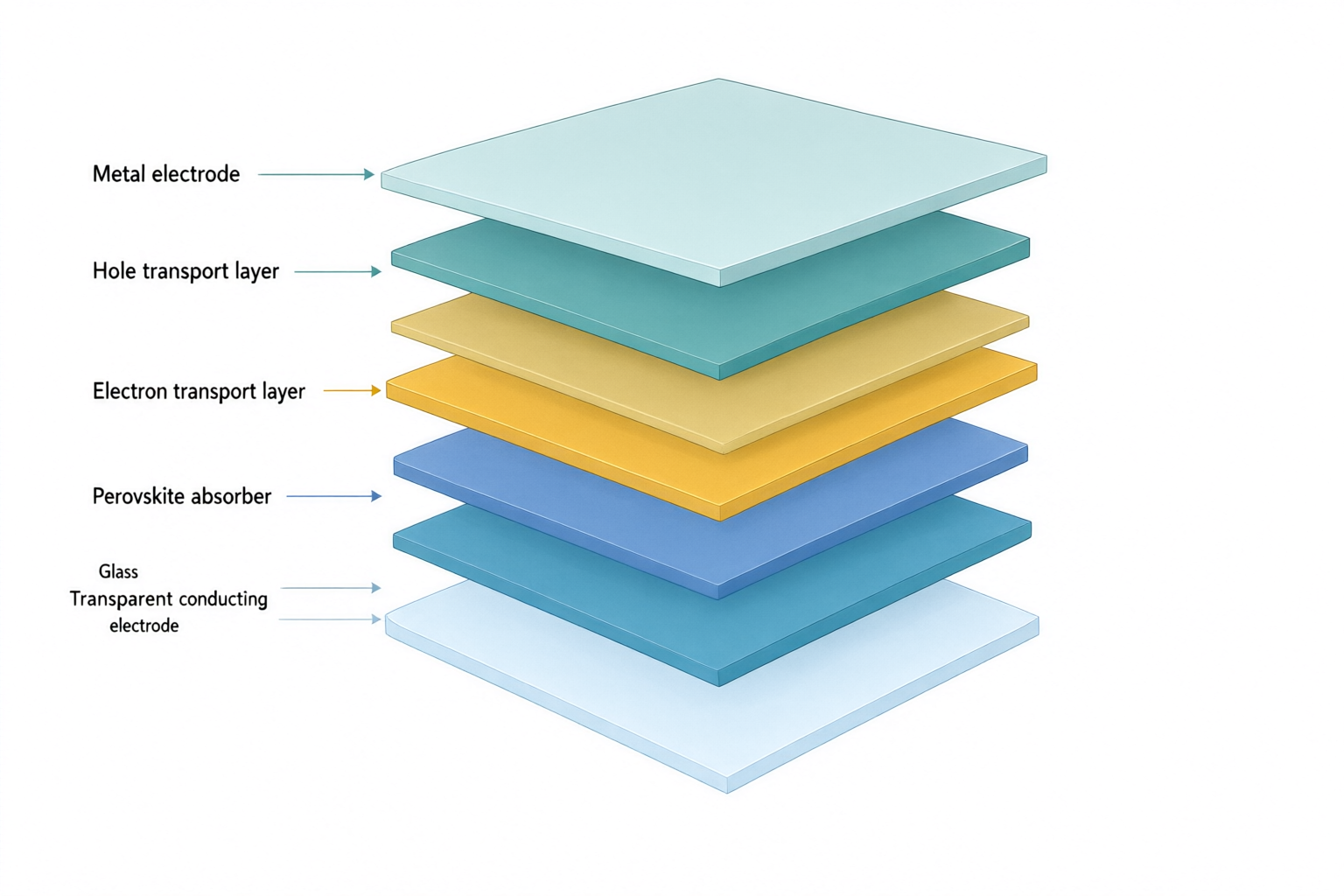
Exploded solar cell stack with labels for glass, transparent electrode, electron transport, perovskite, hole transport and metal.
원본 PNGqwen-image-3.0 · 1536 × 1024

외부에서 다시 그린 참고 그림

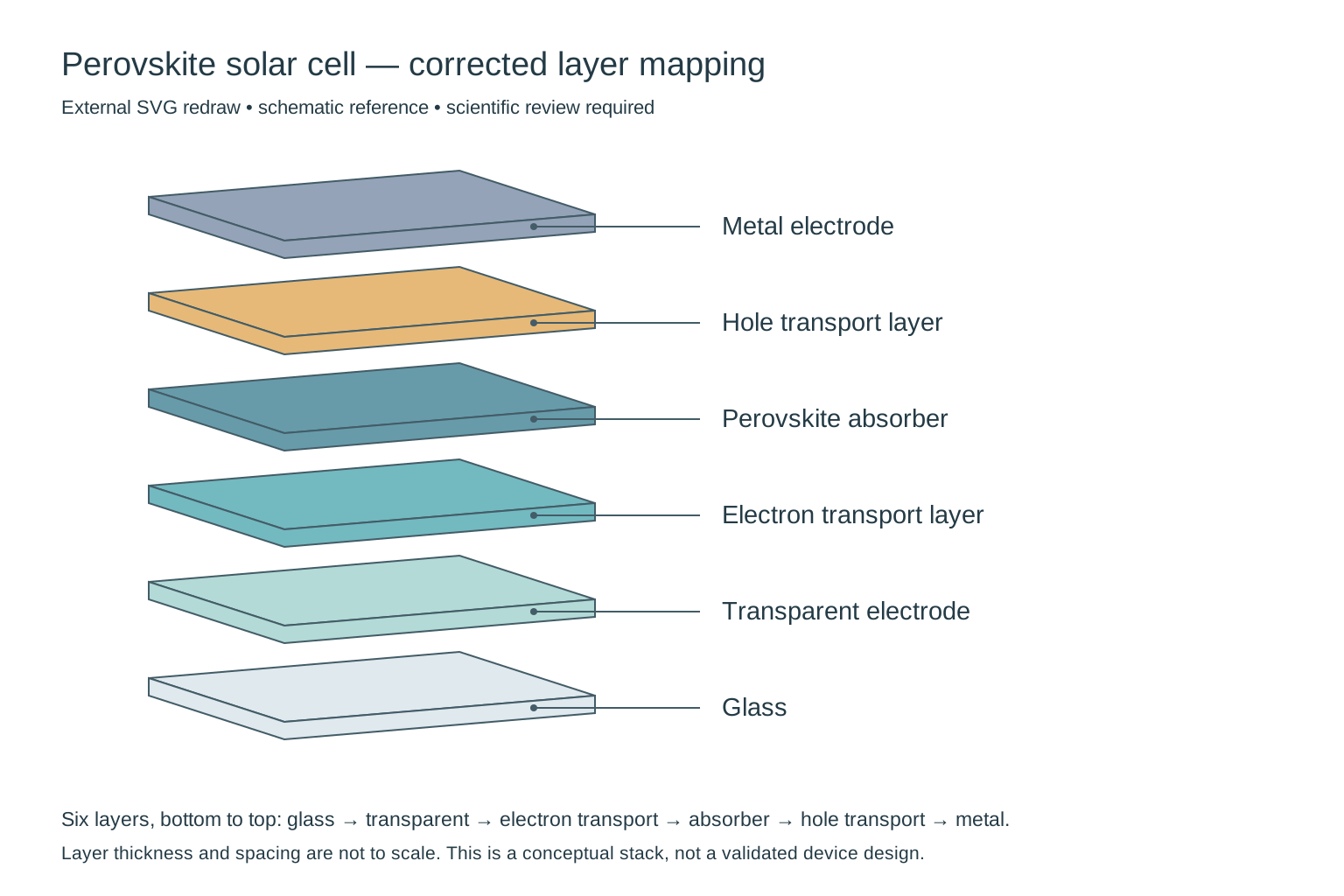
External redraw of exactly six solar-cell layers, from glass at the bottom to metal at the top, with each label connected to its own layer.
비교를 위해 외부에서 다시 그린 SVG이며, 제품의 직접 출력이나 제품 내 편집 기능이 아닙니다. 과학적 검토가 여전히 필요합니다.

과학 이미지

Perovskite solar cell layers

검토 메모

Needs correction: the output adds a seventh slab and does not preserve the requested layer-to-label mapping. In particular, check the electron-transport/perovskite order and the two bottom labels. This is a composition draft, not a validated device architecture; thickness is not to scale.

외부에서 다시 그린 참고 그림

Removed the extra slab, restored the requested six-layer sequence and attached each leader to its matching layer. Thickness and spacing remain schematic; this does not validate a particular device architecture.

입력 및 확인한 내용
연구 개념
An exploded three-quarter cutaway of a conceptual planar perovskite solar cell. Show exactly six separate solid flat slabs, one slab per material, with equal gaps and no internal textures or additional sublayers.
포함할 대상
Glass substrate; transparent conducting electrode; electron transport layer; perovskite absorber; hole transport layer; metal electrode.
관계와 화살표
Stack exactly six layers in the listed order, from glass at the bottom to metal at the top. Connect each label to the middle of its corresponding slab using a thin leader line without arrowheads. Layer thickness is schematic, not to scale.
정확한 라벨 문구 · 선택 사항
Glass; Transparent electrode; Electron transport layer; Perovskite absorber; Hole transport layer; Metal electrode
시각적 지침 · 선택 사항
Minimal textbook diagram with ample whitespace and teal, blue and amber colors. Print ONLY the short labels explicitly listed in the content. No subtitles, paragraphs, footnotes or extra words. These are drawing directions, not text to display.
원본 PNG

아이디어로 시작하기

과학적 장면으로 시작하기

아래 내용은 데모 입력이며 생성 결과나 고객 연구가 아닙니다.

설명에서 초안으로

장면 설명으로 과학 이미지 만들기

독자가 이해해야 할 개념을 정한 뒤 대상과 공간적 관계를 나열하세요. 시각적 지침에 배경, 강조점, 여백을 지정하세요. 용도에 따라 정사각형, 가로형, 세로형을 선택하고 설명을 확인한 뒤 생성된 이미지를 검토하고 다운로드하세요.

  1. 과학적 장면과 핵심 대상 설명
  2. 관계와 시각적 지침 확인
  3. 생성 후 과학적 내용 검토 및 다운로드

그래픽 초록

그래픽 초록이 필요하신가요?

연구 요약을 명확한 시각적 이야기로 바꾸세요. 그래픽 초록 생성 전에 질문, 방법, 결과를 검토하세요.

그래픽 초록 만들기

구조와 구도 확인

대상 위치, 층의 순서, 단면 방향, 라벨 연결선을 확인하세요. 자연스러운 장면이 정확한 축척이나 측정된 구조를 보장하지는 않습니다. 단계나 인과관계가 핵심이면 과학 일러스트 도구를 사용하세요.

과학적 의미와 텍스트를 검토하고 투고할 학술지의 AI, 라이선스, 공개 요건을 확인하세요. 생성된 이미지의 정확성, 학술지 승인, 실험 증거로서의 적합성은 자동으로 보장되지 않습니다.

단계나 관계 화살표가 필요한가요? 과학 일러스트 사용 →

자주 묻는 질문

어떤 과학 이미지를 생성할 수 있나요?

환경 시스템이나 관측 장치 배치처럼 연구 발표, 포스터, 교육 자료를 위한 개념적 장면을 설명할 수 있습니다. 결과물은 설명용 초안입니다. 현미경 이미지, 스캔, 위성 관측 또는 기타 측정 증거가 아닙니다.

슬라이드나 포스터용 이미지는 어떻게 설명하나요?

장면, 반드시 들어갈 대상, 배치를 설명하세요. 시각적 지침에 배경과 주변 슬라이드·포스터 텍스트에 필요한 공간을 지정하세요. 제공되는 이미지 크기를 선택하고 생성 후 구도를 확인하세요.

텍스트와 라벨을 편집할 수 있나요?

설명과 정확한 라벨 문구를 수정한 후 다른 이미지를 생성할 수 있습니다. 이 버전에서는 픽셀, 텍스트 레이어, 벡터, 개별 요소를 직접 편집할 수 없습니다.

어떤 내보내기 형식과 크기를 지원하나요?

1024 × 1024, 1536 × 1024, 1024 × 1536 픽셀의 PNG를 다운로드할 수 있습니다. SVG 및 PPTX 내보내기는 제공하지 않습니다. 제공업체 이미지 링크는 만료되므로 바로 다운로드하세요.