研究を伝えるワークスペース

AI 科学画像生成ツール

研究の概念を視覚化する第一歩に。科学的な場面と主要な対象を指定し、発表、ポスター、教材用の画像の下書きを生成します。

説明用のイラストです。実験の証拠ではありません。

01 / 科学画像を説明する

伝えたい概念を決め、対象とそれらの位置関係を列挙します。背景、強調、余白は見た目の指定に記入します。用途に合わせて正方形、横長、縦長を選び、説明を確定したら、生成画像を確認してからダウンロードしてください。

ラベル・画像サイズ・見た目の指定

抽出時には要約が、画像生成時には確認済みの説明が選択した提供元に送信されます。その提供元への共有が許可された研究のみ送信してください。 現在の処理提供元:Qianwen AI (maas.qianwenaiapi.com)。プライバシーポリシー

新しい版を含め、生成に成功した画像 1 枚につき 1 クレジットを使います。失敗したタスクでは予約済みクレジットが解放されます。PNG のダウンロードに追加クレジットは不要です。

科学画像の生成例

元の PNG は英語のデモ入力から FigureDraft が実際に生成したものです。外部で描き直した図は別途明示しています。確認メモには目に見える問題と制約を記載しています。いずれも独立した科学的検証は受けていません。

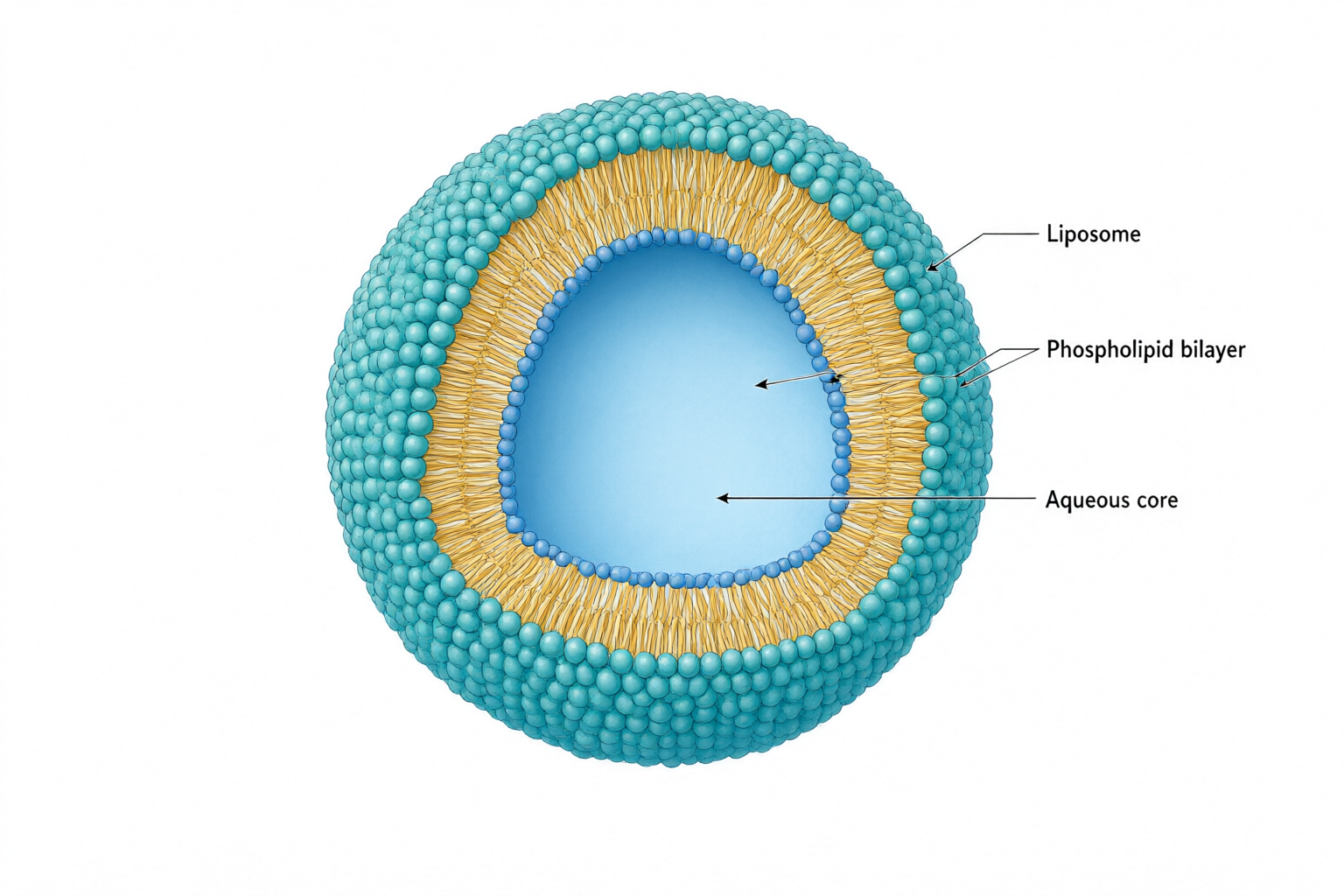
Cutaway liposome with a teal phospholipid surface, amber tails and an aqueous core, connected to three labels.
元の PNGqwen-image-3.0 · 1536 × 1024

科学画像

Liposome cross-section

確認メモ

The cutaway separates the aqueous core from the membrane, and all three requested labels are readable. One bilayer leader extends into the core instead of ending on the membrane. Correct that endpoint and verify the two-leaflet structure before use; molecular packing is schematic.

入力と確認済みの内容
研究の概念
An educational cutaway of a spherical liposome showing a phospholipid bilayer surrounding an aqueous core. Use a three-quarter view with a clean wedge removed to reveal the interior. Keep the structure schematic, not molecularly resolved.
含める対象
One liposome; phospholipid bilayer with hydrophilic heads and hydrophobic tails; aqueous core.
関係と矢印
The bilayer encloses the aqueous core. Hydrophilic heads face the surrounding water and the aqueous core; hydrophobic tails point inward toward each other within the bilayer. Three leader lines connect the labels to their objects. No transport arrows.
正確なラベル · 任意
Liposome; Phospholipid bilayer; Aqueous core
見た目の指定 · 任意
Minimal textbook diagram with ample whitespace and teal, blue and amber colors. Print ONLY the short labels explicitly listed in the content. No subtitles, paragraphs, footnotes or extra words. These are drawing directions, not text to display.
元の PNG
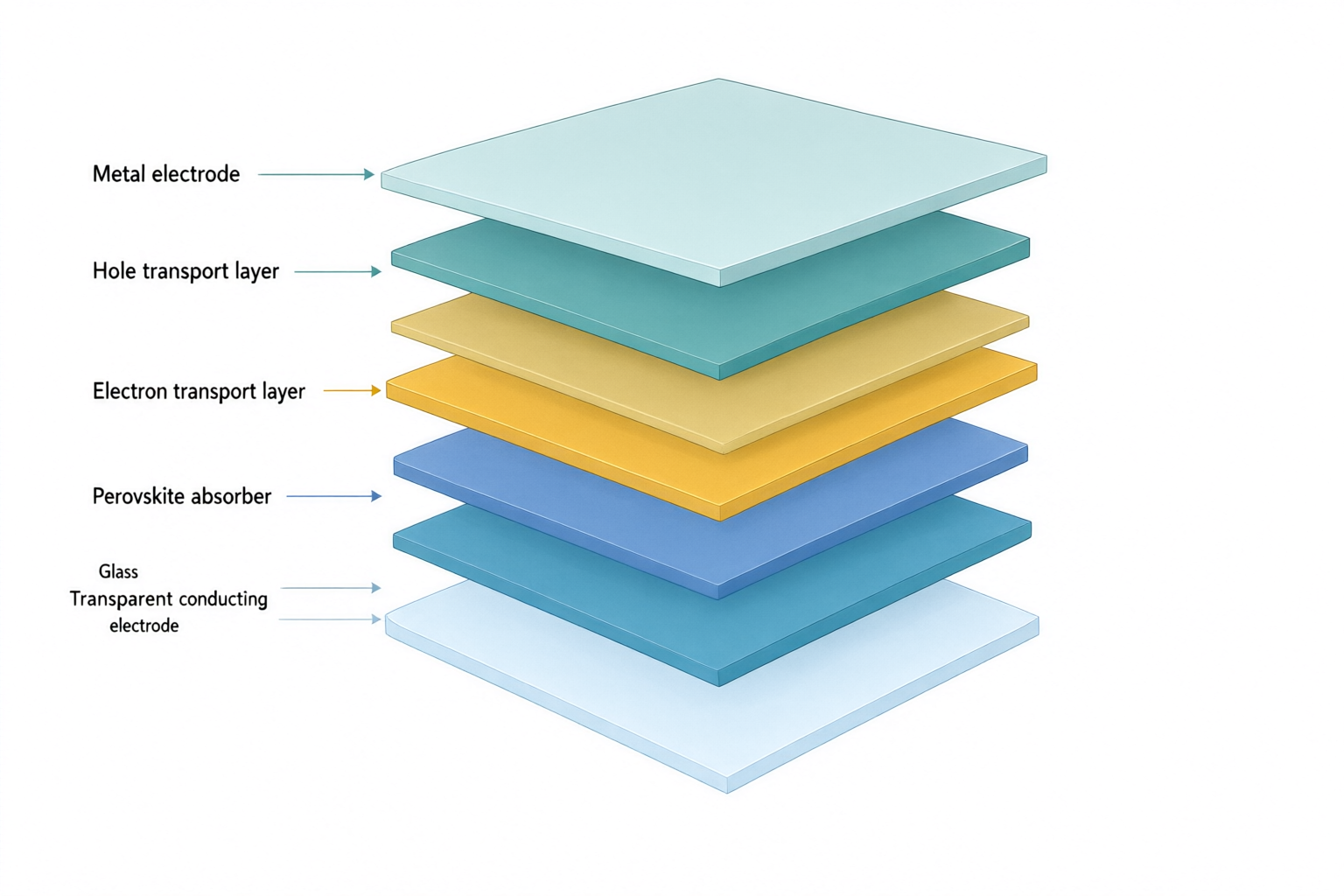
Exploded solar cell stack with labels for glass, transparent electrode, electron transport, perovskite, hole transport and metal.
元の PNGqwen-image-3.0 · 1536 × 1024

外部で描き直した参考図

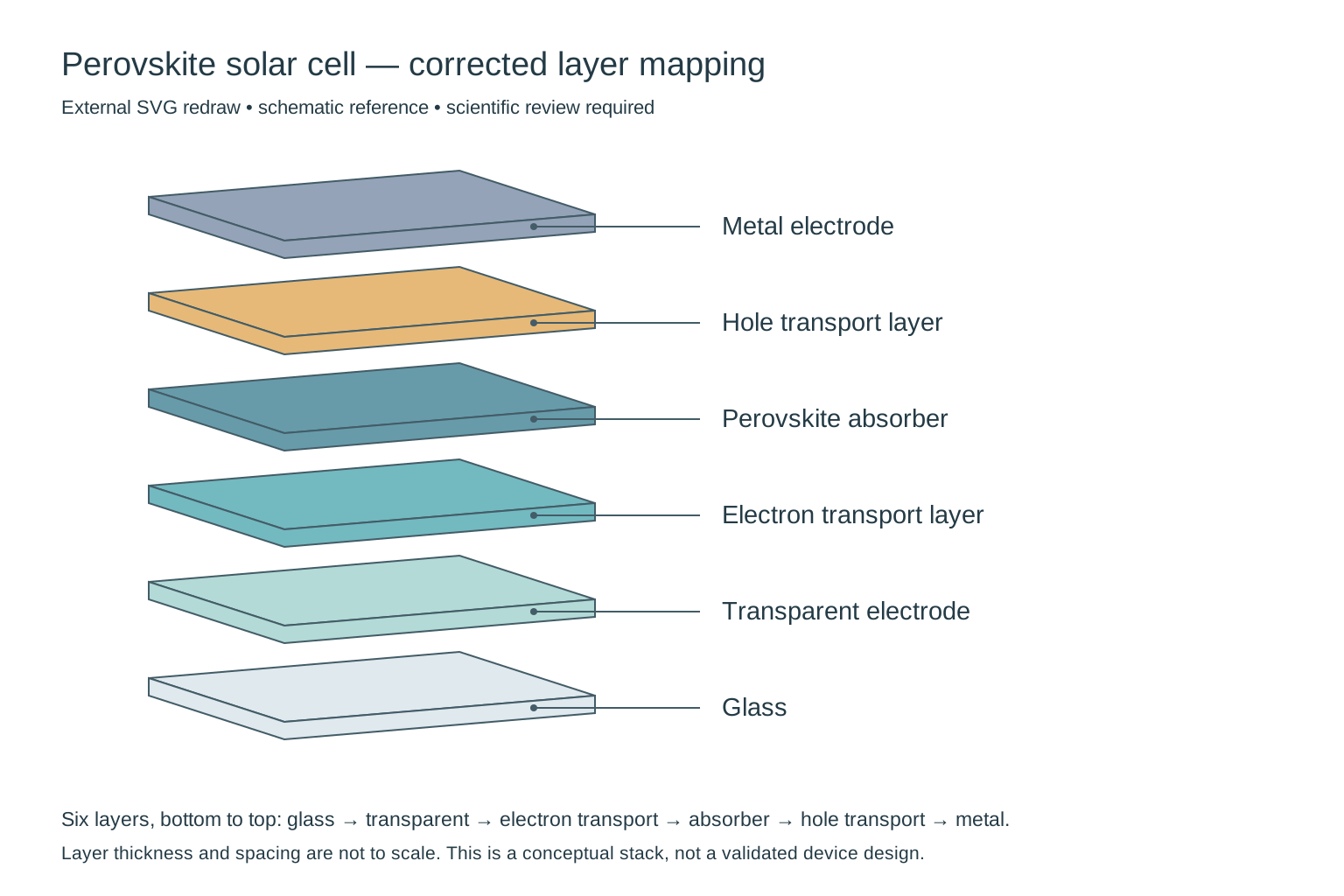
External redraw of exactly six solar-cell layers, from glass at the bottom to metal at the top, with each label connected to its own layer.
比較用に外部で描き直した SVG です。製品の直接出力や製品内の編集機能ではありません。科学的な確認は引き続き必要です。

科学画像

Perovskite solar cell layers

確認メモ

Needs correction: the output adds a seventh slab and does not preserve the requested layer-to-label mapping. In particular, check the electron-transport/perovskite order and the two bottom labels. This is a composition draft, not a validated device architecture; thickness is not to scale.

外部で描き直した参考図

Removed the extra slab, restored the requested six-layer sequence and attached each leader to its matching layer. Thickness and spacing remain schematic; this does not validate a particular device architecture.

入力と確認済みの内容
研究の概念
An exploded three-quarter cutaway of a conceptual planar perovskite solar cell. Show exactly six separate solid flat slabs, one slab per material, with equal gaps and no internal textures or additional sublayers.
含める対象
Glass substrate; transparent conducting electrode; electron transport layer; perovskite absorber; hole transport layer; metal electrode.
関係と矢印
Stack exactly six layers in the listed order, from glass at the bottom to metal at the top. Connect each label to the middle of its corresponding slab using a thin leader line without arrowheads. Layer thickness is schematic, not to scale.
正確なラベル · 任意
Glass; Transparent electrode; Electron transport layer; Perovskite absorber; Hole transport layer; Metal electrode
見た目の指定 · 任意
Minimal textbook diagram with ample whitespace and teal, blue and amber colors. Print ONLY the short labels explicitly listed in the content. No subtitles, paragraphs, footnotes or extra words. These are drawing directions, not text to display.
元の PNG

アイデアから始める

科学的な場面から始める

これらはデモ用の入力です。生成結果やお客様の研究ではありません。

説明から下書きへ

場面の説明から科学画像を作成

伝えたい概念を決め、対象とそれらの位置関係を列挙します。背景、強調、余白は見た目の指定に記入します。用途に合わせて正方形、横長、縦長を選び、説明を確定したら、生成画像を確認してからダウンロードしてください。

  1. 科学的な場面と主要な対象を説明
  2. 関係と見た目の指定を確認
  3. 生成し、科学的内容を確認してダウンロード

グラフィカルアブストラクト

グラフィカルアブストラクトが必要ですか?

研究要約を分かりやすい視覚的なストーリーに。生成前に課題、方法、知見を確認します。

グラフィカルアブストラクトを作成

構造と構図を確認

対象の位置、層の順序、断面の向き、ラベルの引出線を確認してください。見た目が自然でも縮尺や構造の測定精度を保証しません。手順や因果関係が中心なら科学イラストツールを使用してください。

科学的な意味と文字を確認し、投稿先の AI、ライセンス、開示要件を確認してください。生成画像が自動的に正確になる、学術誌に承認される、実験の証拠に適するということはありません。

手順や関係の矢印が必要ですか?科学イラストへ →

よくある質問

どのような科学画像を生成できますか?

環境システムや観測装置の配置など、研究発表、ポスター、教材用の概念的な場面を説明できます。出力は説明用の下書きです。顕微鏡画像、スキャン画像、衛星観測、その他の測定による証拠ではありません。

スライドやポスター用の画像をどう説明すればよいですか?

場面、必須の対象、その配置を記入してください。見た目の指定には背景と、周囲のスライドやポスターの文字用に必要な余白を書きます。利用可能な画像サイズを選び、生成後に構図を確認してください。

文字やラベルを編集できますか?

説明とラベルの正確な文言を修正して別の画像を生成できます。この版ではピクセル、文字レイヤー、ベクター、個別要素の直接編集はできません。

対応する形式とサイズは?

1024 × 1024、1536 × 1024、1024 × 1536 ピクセルの PNG をダウンロードできます。SVG と PPTX の出力は提供していません。提供元の画像リンクは期限付きのため、速やかにダウンロードしてください。